ZBrush, a digital clay sculpting software, is being pulled more and more from its original movie and gaming roots into use as a product development tool, including in jewelry design. In part one of this series (which appeared in the June 2018 issue of MJSA Journal), we saw how ZBrush can be used alongside traditional jewelry CAD techniques. In part two, we will look at production-friendly tools within ZBrush.
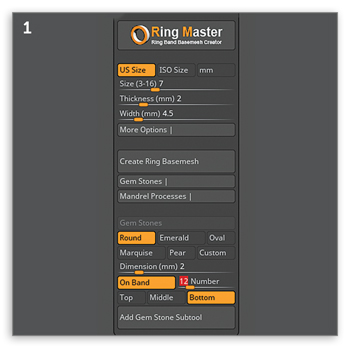
ZBrush has often been viewed as a difficult software to work with for engineering real-world objects, but recent developments within the program have made it much easier to create models for production. For starters, a plug-in, Ring Master, is available from Pixologic, the makers of ZBrush. This plug-in quickly creates base bands of specified size, width, and depth that can then be sculpted on (Figure 1).
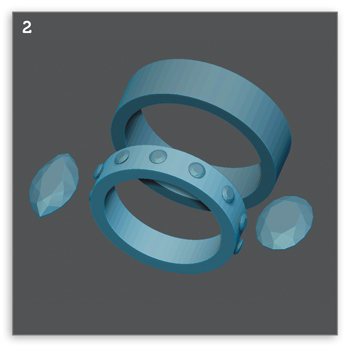
It also has gemstone options. We can choose the cut and size of a single gemstone or even place gems around the band we create (Figure 2). The gem feature can be used independently of the band feature, making it that much more useful.
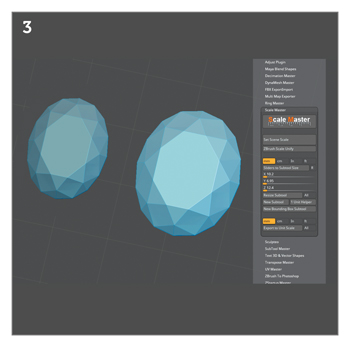
Keeping track of scale and measuring models has previously been challenging, but additions to the 4R8 version of the program have greatly reduced these issues. The included plug-in Scale Master allows the user to set the scale size of any object and even change that size later, if needed. For example, in Figure 3, the generic 10 mm x 8 mm Ring Master stone on the left has been resized using Scale Master to be a custom 12.4 mm x 10.2 mm x 6.95 mm stone.
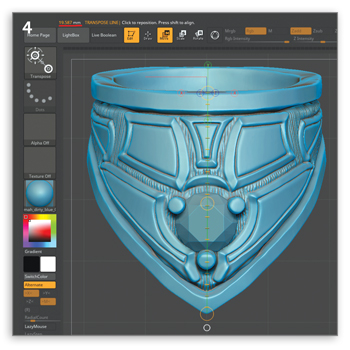
Once a set scale has been established for a file, the transpose line can be used to measure out any part of a model with great accuracy. In the ring example in Figure 4, the transpose line is drawn out and calculates the width of the ring as 19.587 mm, which is displayed in the upper left-hand corner. Any object can be measured quickly on the fly to maintain tolerances for prongs, openings, walls, etc.
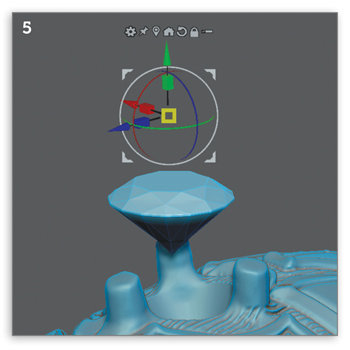
Two additional new features to the 4R8 version of the program, which have familiar features to current CAD users, are Gizmo and Live Booleans. Gizmo (Figure 5), which Rhino users will recognize for its similarity to Gumball, allows users to move, scale, rotate, and copy objects while also having built-in transform tools, such as twist and taper.
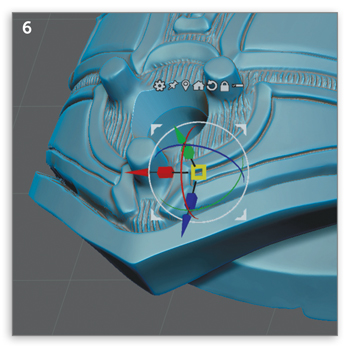
Live Booleans give the functionality all CAD users are accustomed to while interjecting a new element in which Boolean adjustments (Figure 6) can occur in real time.
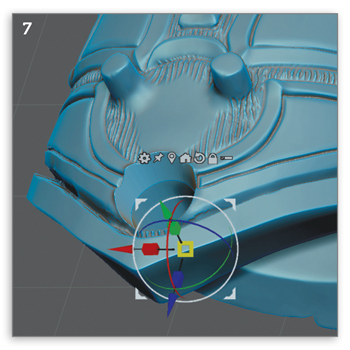
Adjustments can then be applied to the actual geometry of the piece (Figure 7).
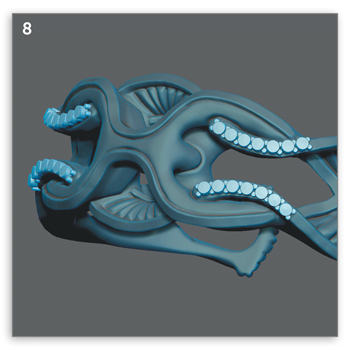
Gems, prongs, and gem cutters are a part of any CAD user’s workflow for jewelry, and, while there are currently no pre-existing tools for these functions outside of the limited use of gems in Ring Master, a user can custom create these tools within the program. While these tools can be time-consuming to set up, once made, they allow for easy calibration and use of gems, prongs, and gem cutters in a single brush stroke. The parts can then be split into gems, prongs, and gem cutters as separate subtools, ready for Boolean functions (Figure 8).
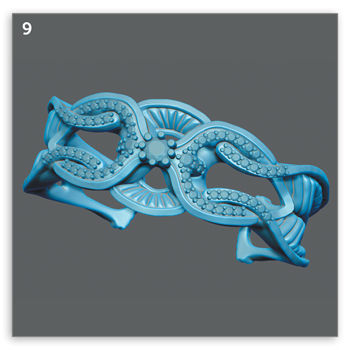
Probably the most overlooked benefit of incorporating ZBrush into a jewelry CAD workflow is how it is a return to the sculptural modeling style of wax working. With subtle brushstrokes, it is reminiscent of how jewelry waxes were first created, and gives a hand-touched artistry that engineered CAD alone rare-ly possesses (Figure 9). All of the aforementioned tools aside, the most production-friendly reason to use ZBrush for jewelry is the return to craftsmanship, just digitally.
To provide the best experiences, we use technologies like cookies to store and/or access device information. Consenting to these technologies will allow us to process data such as browsing behavior or unique IDs on this site. Not consenting or withdrawing consent, may adversely affect certain features and functions.
Functional
Always active
The technical storage or access is strictly necessary for the legitimate purpose of enabling the use of a specific service explicitly requested by the subscriber or user, or for the sole purpose of carrying out the transmission of a communication over an electronic communications network.
Preferences
The technical storage or access is necessary for the legitimate purpose of storing preferences that are not requested by the subscriber or user.
Statistics
The technical storage or access that is used exclusively for statistical purposes.The technical storage or access that is used exclusively for anonymous statistical purposes. Without a subpoena, voluntary compliance on the part of your Internet Service Provider, or additional records from a third party, information stored or retrieved for this purpose alone cannot usually be used to identify you.
Marketing
The technical storage or access is required to create user profiles to send advertising, or to track the user on a website or across several websites for similar marketing purposes.
A Fresh Look. A New Website. A Stronger Membership.
We’re excited to unveil Jewelers of America’s refreshed brand and redesigned website, reflecting our growing community and continued commitment to the jewelry industry.
With JA and MJSA now united under one membership, we’re bringing together more resources, expertise and connections to support every facet of the jewelry industry.
Take a look around to see all that JA offers — members can login to access member-only content like benefits, the Knowledge Vault and Advocacy resources.
Questions? Contact us at members@jewelers.org or call/text (800) 223-0673.