How to Use a Three-point Setup to Enhance CAD Renderings
In the Best Light
Three-point lighting arrangements can help showcase your design to its best advantage
By Darla Alvarez, GIA Jewelry Design and Technology Instructor
(Originally Published by MJSA July, 2025)
When rendering a model for client approval, lighting often poses the greatest challenge. It’s the lighting that gives a render its realism, making the design feel tangible. Mimicking a real-world studio setup—specifically, a three-point lighting arrangement—can help address common lighting issues and showcase your design to its best advantage.
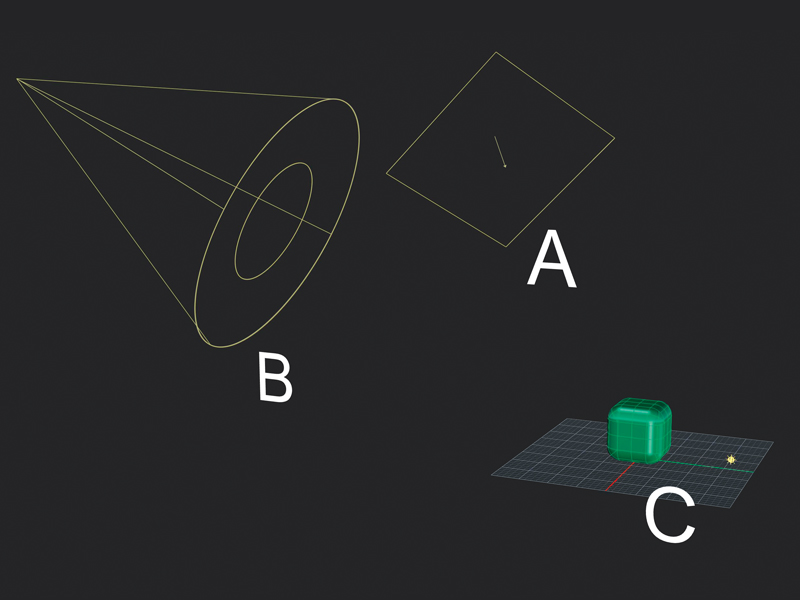
We will use traditional three-point lighting, which consists of a key light, a fill light, and a rim (or back) light. For our example, we’ll illuminate a simple object to clearly show how each light contributes to the final image. In this image taken in Rhinoceros 3D, the key light (A) is a rectangular light, the fill light (B) is a spotlight, and the rim light (C) is a point light. They are arranged in a rough triangle around the model, positioned far enough away to stay out of the frame while still providing full illumination.
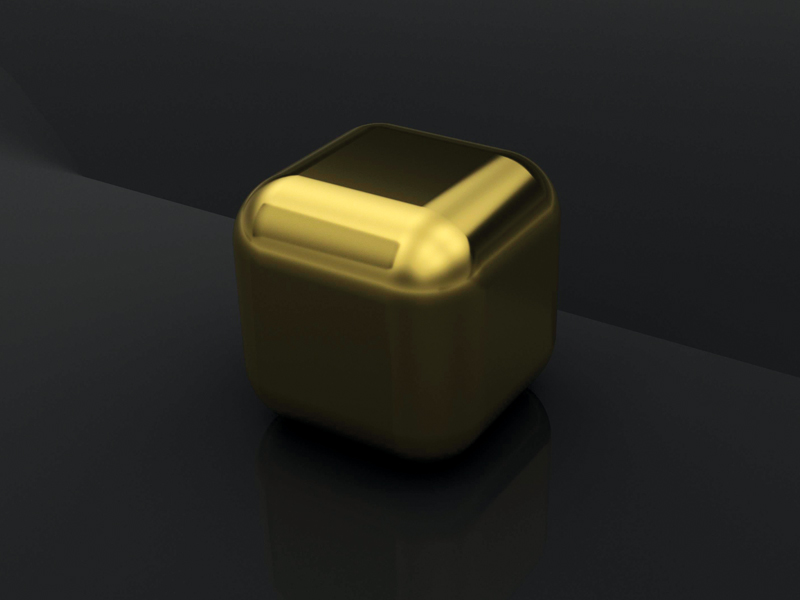
We’ll start with the default lighting settings. At this stage, the model appears mostly dark, lacking clarity and dimensionality.
Turn on the key light first. This is the primary light source and establishes the dominant direction of light. It should be the brightest of the three. A rectangular light works well for this because it provides diffuse, broad lighting.
Next, activate the fill light. Its purpose is to extend the illumination created by the key light to the dark side of the model. It serves as a secondary light source. A spotlight is used because it creates a direct, targeted light.
Finally, turn on the rim light. This light helps separate the model from the background by outlining its back edge. A point light works well as a rim light because it emits light in all directions, illuminating everything behind the subject.
Walking through each light individually demonstrates the role each one plays in the three-point lighting set up. While the types, position, intensity, and number of lights may vary depending on the model, three-point lighting is a reliable starting point for producing realistic, compelling renders. It helps you effectively communicate your design and gives clients a more lifelike preview of the final piece.
Manage Consent
To provide the best experiences, we use technologies like cookies to store and/or access device information. Consenting to these technologies will allow us to process data such as browsing behavior or unique IDs on this site. Not consenting or withdrawing consent, may adversely affect certain features and functions.
Functional
Always active
The technical storage or access is strictly necessary for the legitimate purpose of enabling the use of a specific service explicitly requested by the subscriber or user, or for the sole purpose of carrying out the transmission of a communication over an electronic communications network.
Preferences
The technical storage or access is necessary for the legitimate purpose of storing preferences that are not requested by the subscriber or user.
Statistics
The technical storage or access that is used exclusively for statistical purposes.The technical storage or access that is used exclusively for anonymous statistical purposes. Without a subpoena, voluntary compliance on the part of your Internet Service Provider, or additional records from a third party, information stored or retrieved for this purpose alone cannot usually be used to identify you.
Marketing
The technical storage or access is required to create user profiles to send advertising, or to track the user on a website or across several websites for similar marketing purposes.
A Fresh Look. A New Website. A Stronger Membership.
We’re excited to unveil Jewelers of America’s refreshed brand and redesigned website, reflecting our growing community and continued commitment to the jewelry industry.
With JA and MJSA now united under one membership, we’re bringing together more resources, expertise and connections to support every facet of the jewelry industry.
Take a look around to see all that JA offers — members can login to access member-only content like benefits, the Knowledge Vault and Advocacy resources.
Questions? Contact us at members@jewelers.org or call/text (800) 223-0673.