

Testing the xTool F1 Laser Engraver
Leaving Your Mark
Putting xTool’s latest offering to the test
By Melissa Muir
(Originally Published by MJSA May 2024)
Have you noticed the uptick in ads for personal use lasers? They can do everything from marking a name on metal to cutting out acrylic, wood, paper, and other materials. They allow the general at-home user to become a prolific artist able to create highly customized visual and functional works of art.
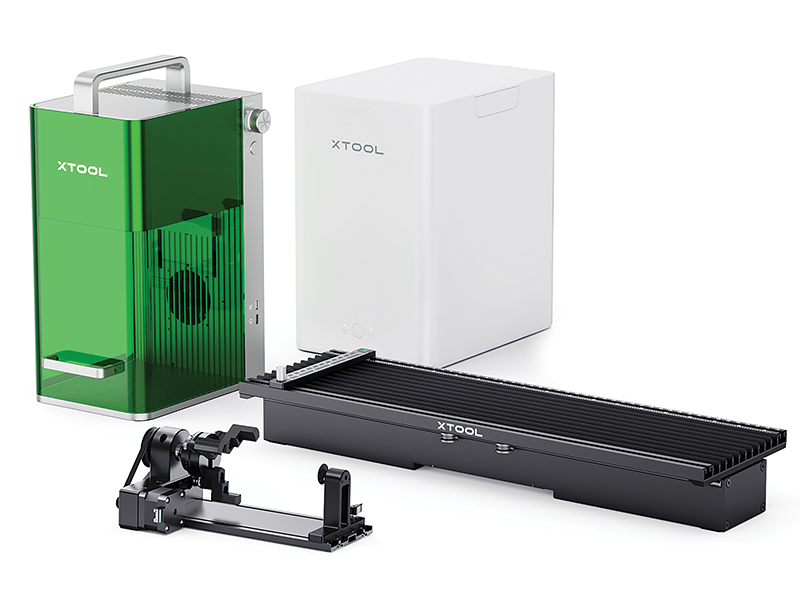
xTool f1 Laser Engraver
Laser Type: 10W diode laser & 2W 1064 nm infrared laser
Dimensions: 17.9 cm long by 23.5 cm wide by 33.4 cm high
Weight: 4.6 kg
Working Area: 115 mm by 115 mm rounded rectangle
What’s Included:
• Triangular prism working panel
• L-shaped positioning piece
• Material pack
• Power adapter
• Power cable
• USB cable
• Lint-free cloth
As Shown Above: Deluxe bundle includes Desktop Air Purifier, F1 Slide Extension, and RA2 Pro Rotary Tool
There was a campaign a few years ago to create an affordable CO2 laser that was easy to use. Things have accelerated since then, and even fiber lasers have come down in price. Between the CO2 and fiber lasers, are diode lasers, such as the xTool and LaserPecker series of lasers.
I was initially interested in the xTool F1 laser for its metal-marking capabilities. While it is advertised that it will engrave on metal, it is not engraving like you would expect with a graver. In fact, it is more like marking the surface of the metal. It does do a little metal removal, but you need a lot of power and multiple passes to make a mark that cannot be rubbed off with normal wear. That wasn’t an issue for me, as I was looking to mark my metal with designs that would then be hand engraved with my gravers or pierced out with my jewelers saw.
About the System
The xTool F1 is a cutting-edge laser equipped with a dual-galvanometer laser, using two precision mirrors to effectively direct the laser beam along the X and Y axes to the engraving surface. This technology allows for rapid movement of the laser beam by reflecting off the internal mirrors, resulting in remarkable speed. The machine is equipped with two lasers: a 10-watt blue light diode and a 2-watt infrared laser.
The 2-watt 1064 nm infrared laser works with many different metals: gold, platinum, silver, brass, copper, and more. The 10-watt 455 nm blue light diode laser will mark and cut additional materials such as dark acrylic, wood, cardboard, and leather.
The xTool F1 is one of the faster lasers on the market. However, not every process is fast. For example, this laser has become popular for customizing small charms, bracelets, pendants, and rings. When it comes to getting a good mark on metal, speed and power are going to determine the permanence of the marking. If you use a faster speed, the metal will be marked, but it’s possible the marking will be gone within a few weeks with normal wear. With high-power settings at a slower speed, and if you go over the area multiple times, the laser will remove more of the surface, making the engraving deeper and more permanent.
There are a number of accessories for the machine that allow you to make larger pieces as well as multiple pieces.
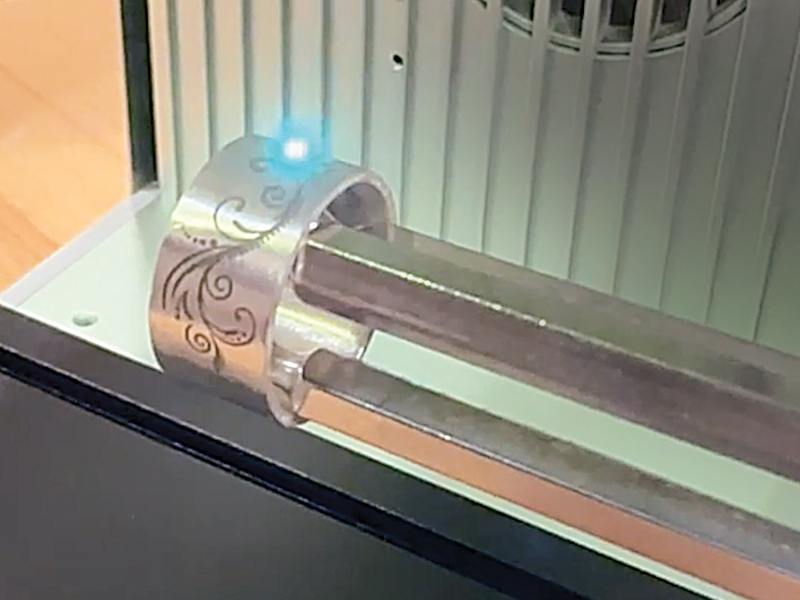
There are a number of accessories available for use with the xTool F1, including the RA2 Rotary Tool for holding rings and bracelets. It makes easy work of engraving on the inside and outside of round surfaces.
I like the RA2 Rotary Tool for holding rings and bracelets. It makes easy work of being able to engrave on both the inside and outside of a round surface. It can be a little complicated to assemble everything, but the directions included are very clear and easy to follow.
One other accessory is the Slide Extension sliding table that allows you to work with longer pieces, such as bracelet blanks, or you can place multiple pieces and have the machine systematically engrave each based on the settings entered into the xTool Creative Space (XCS) design software.
The XCS software currently supports SVG, DXF, PNG, JPG, JPEG, and BMP file formats. While it can rasterize images, it does the best with vector files that are scalable. In addition to the XCS, the F1 laser will work with Lightburn, a program that is widely used for 3-D and laser printing.
The processing area of the xTool F1 is 11.5 cm by 11.5 cm, which is fairly small, but I have found it to be sufficient for jewelry purposes. I have also found the engraving to be quite fine and precise. The engraving accuracy can reach 0.00199 mm, and it can print text as small as 1 mm tall.
A Note About Safety
When working with lasers, it is very important to understand that care must be taken to protect your eyes. Looking at the laser light will damage them. The F1 has a protective cover that can be lowered and will filter out both the blue light and infrared lasers. You can also purchase glasses to use when a piece is too large to close the cover. The cover is attached and simply slides up and down, giving access to the work area.
As stated earlier, the material is vaporized with the intense energy of the laser, and that can pose some huge safety issues. The machine is set up to work with an air purifier—one that can either be purchased with a deluxe kit or separately. In addition, a hose can be fitted to the back of the machine to vent out a window or door.
The machine also has a built-in fire detector. If a piece happens to catch fire, the machine will stop and sound a very loud alarm. It is important to keep an eye on the machine and materials while the machine is running. While I can do other things as the machine processes my pieces, I always stay within a few paces of it.
How Well Does It Work?
As I mentioned earlier, I was most interested in marking my metals for hand-engraving purposes. I started with copper, making a test array file to help me find the correct settings for creating a dark mark on the metal. It is important that the laser is focused. There are two lights that project onto the bottom grid plate and when aligned, the machine is in focus. The machine can be focused either manually or automatically. Once the array test has been run, you can easily see which settings will give you the desired effect. I like to do this array test for every material I plan to engrave or cut. This process works with both the blue light and infrared laser.
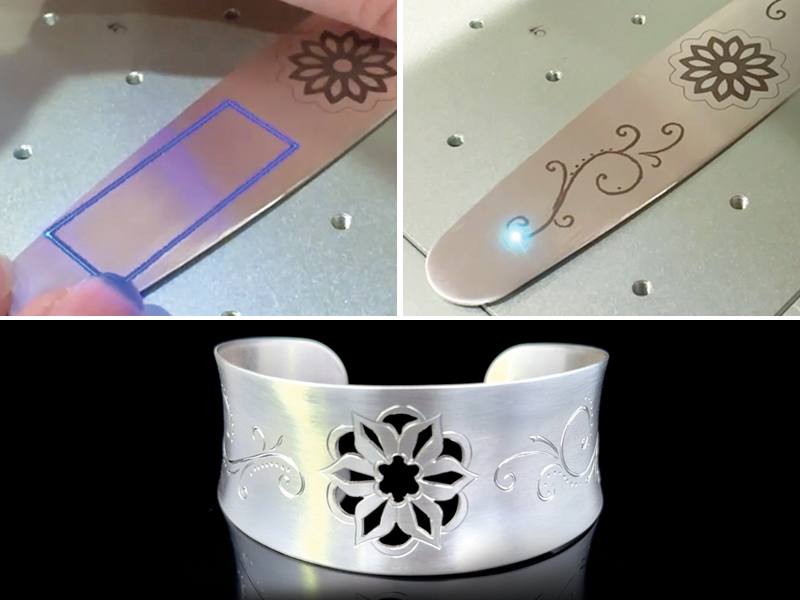
While multiple passes are needed to make marks that can’t be worn off with normal wear, the xTool F1 is adept at marking metal with designs that can then be hand engraved with gravers or pierced out with a jewelers saw.
Once the machine is focused on the material, you need to ensure the design is aligned on the piece. An option called “framing” produces a blue border indicating the outer edges of the design. With the framing option active, I can fine-tune the placement of my piece before beginning the process. Once that is done, I close the protective cover and tell the machine to start. Depending on the job, it can be completed in anywhere from 30 seconds to more than 15 minutes. The time is determined by the materials, desired effects, and depth of engraving or marking.
I have tried many surface finishes both before and after the engraving process. Let’s take silver, for example. I get the best dark marking with a matte or satin finish on the metal. However, I still get a nice dark, clear marking when it has been highly polished. If I use a brass brush after marking, the dark look will become much lighter. Liver of sulfur didn’t seem to have much effect, as the marking does not go deep enough for it to really sink under the top surface of the piece. If the marking is applied with just one cycle of the laser, it is barely on the surface and will easily rub off within a month of normal wear. I find that when I process the design two to four times, it is much more lasting and does not buff off easily.
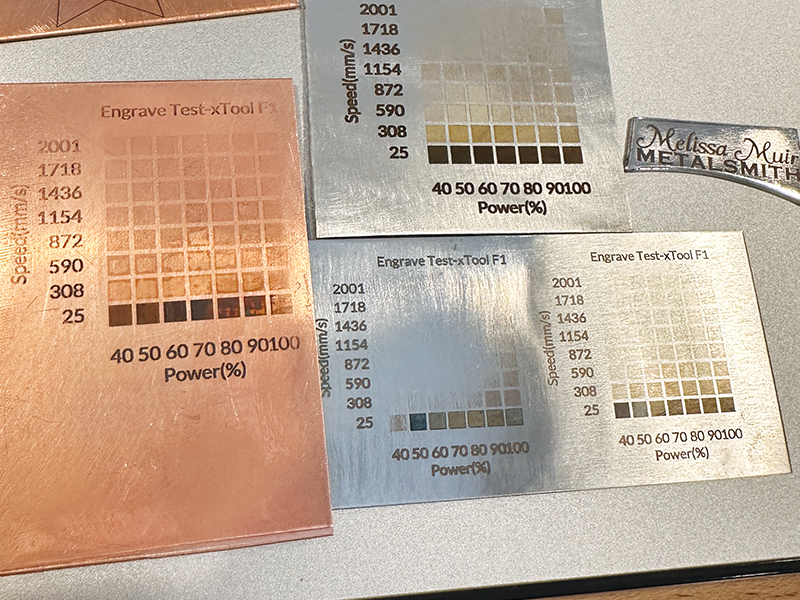
Array tests on various metals
While there is a bit of a learning curve to the design software, it isn’t as overwhelming as others, and I have found the xTool online community to be very helpful in giving suggestions and answering questions when challenges arise.
Finally, although I primarily focused my testing on engraving metals, the machine is actually quite versatile in many other materials. I encourage anyone interested to do a quick internet search to see the full array of design possibilities.
MJSA would like to thank xTool for providing the machine for review. The company is offering readers an $80 discount on the purchase of the xTool F1 (discount code: xToolMuir).