

The More You Know
The More You Know
A thoughtful and patient approach is crucial for successfully creating castable models
By Gary Dawson
When I was initially approached about pulling together an article on my “top 10 CAD tricks,” I was a little leery, as I’m not the biggest fan
of top 10 lists unless they’re part of a comedy routine. But I’m not one to turn down a challenge, so here’s my list…
10. Know your software
9. Model thoughtfully
8. Know your hardware
7. Model thoughtfully
6. Know the casting process
5. Model thoughtfully
4. Know your metal
3. Model thoughtfully
2. Have a vision
1. Keep manufacturing in mind!
OK, I’ve had my fun, but the list above is no joke, really. I will elaborate, of course, though I’m not sure this will emerge as a “list of tricks” per-se, but let’s embark on the journey of creating a castable model.
Know Your Software
I see so many people on social media forums and groups that obviously have spent zero time learning the capabilities of their software. I get a little irked when folks show up with an idea that is way over their modeling capabilities asking for help. Now, don’t get me wrong, seeking mentoring is both necessary and smart. And as a CAD instructor, I like to help people improve their modeling. But do not approach the complex process of successfully creating a printable—and castable—model with the idea that you are not going to have to put the time in to get it right! People aren’t going to do it for you.
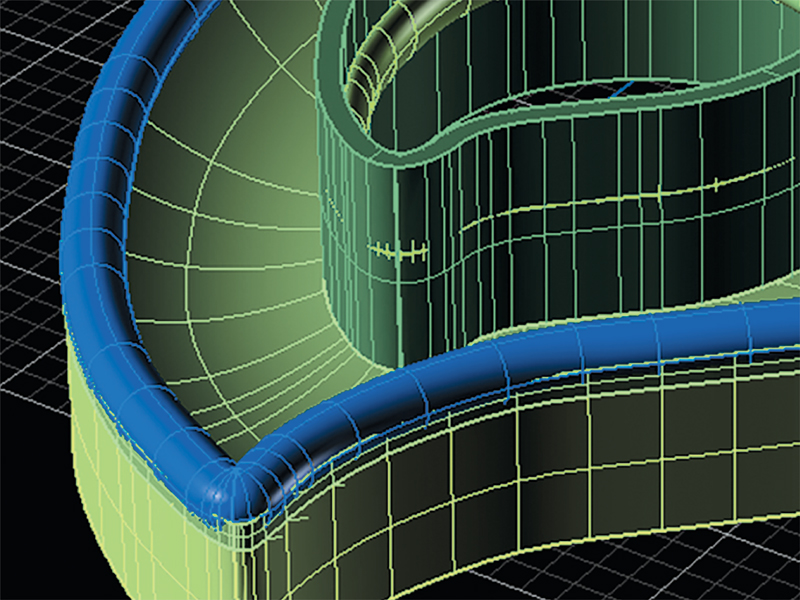
Do not approach the complex process of successfully creating a printable—and castable—model with the idea that you are not going to have to put in the time to get it right.
In that vein, much of the “help” I see given on these social media platforms is given by folks that are early in their own learning curves and eager to demonstrate new knowledge. Maybe they are trying to be helpful, but often the advice given is less than optimal because of an incomplete understanding on the part of the advice giver of the commands and procedures they suggest.
While it requires an additional investment, I think it is a great idea to get at least some formal training to accelerate your learning curve. I also think part of knowing your software is knowing your own capabilities and limitations. I teach CAD incrementally, building a base of understanding about how the software works, and then laying skillsets on top of that base. Trust me, it’s the shortest path to mastery for most people.
Know Your Hardware
Will the output be created using an additive or subtractive process? In general, additive manufacturing (AM) is the process of building up a model in layers (as done by 3-D printers), while a subtractive process (milling) is removing material from a larger portion of material. There are sub-topics to consider for each type of operation.
Milling
If you’re creating designs that will be milled, how many axes do you have to work with? For example, you can create a 1950’s style, die-struck looking ring with only three axes, but you will need to split the model in two, mill both sides of both halves, and then manually join the two halves, either in the wax, or by soldering after casting. If you have a 5-axis machine, you can leave the model whole and the magic of 5-axis milling will create the entire piece, intact and ready to cast in one piece.
Now for the first “trick.” You do not have to create solids when milling. The software (g-code) will mill to surfaces. This can be a problem for people who grew up using milling as their only process when they try for the first time to model for a 3-D printer. When I was selling and supporting 3-D printers I offered to print a sample for prospective customers. I would often get models that were (maybe) a solid base with details floating just off the surface. No problem for a mill, not so good for any AM machine.
Printing
If you are using AM, you will need to create solids—no floating surfaces allowed! Solids can be spheres, cones, cylinders, boxes, and similar objects that your CAD application can likely produce in one step. Solids can also be extrusions and joined polysurfaces, if all edges are joined, and the object is “manifold” (being able to hold water with no leaks). And one convenience for most AM users is that you can stack solids. That is, they can overlap each other, and the print will still come out fine. (You can also stack solids when milling; the mill will mill only to the outer boundaries.)
This is not true for all AM systems though, so you’ll want to check the specifics of your printer. (If you’re not going to print your models inhouse, check with your subcontractor on the capabilities of the printers they use.) For some, you must have one single solid for the system to recognize it as a solid. If your design consists of stacked solids, as most do, you can Boolean them together into one object and that will be fine. Boolean Unions can be stubborn at times though so the trick here is to join, or union, objects as you go along in the modeling process if you know your output needs to be a single solid when finished. In that way at the end of your design process you are not trying to Boolean Union many objects at one time, which may choke your system, but just a few. The fewer, the better.
Know Your Model
How do you know if you have solids only in your model? I’m a Rhino user and don’t know a lot about other applications so I must rely on my Rhino experience for much of the following, but I’ll lead this section with a quick and dirty trick that will work in Rhino and any application that uses Rhino as its base app. (I suspect other apps have similar features.) If you get a valid outcome from a volumetric analysis, you very likely have a solid model, or at least valid, stacked solids are comprising your model. If you do not have solids, you will likely get an error message of some kind when attempting a volumetric analysis. Then it is time to go exploring. How do you find the problem?
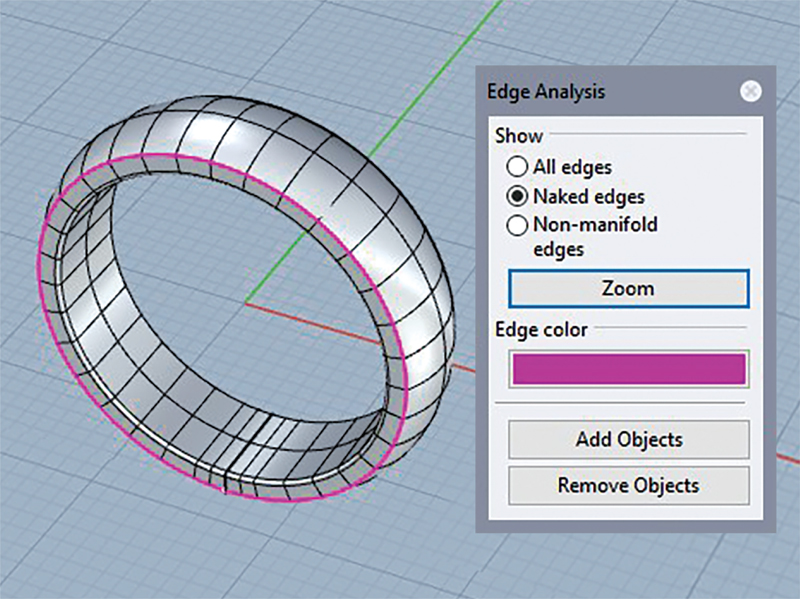
Rhino users can use the “Show Edges” command to reveal any naked edges, which are surface edges that have not successfully joined in a polysurface. In this example, the cross-section curve used to sweep the ring rail was not closed at one point.
“Show Edges” is a command within Edge Tools in Rhino that can be immensely helpful in showing naked edges, which are surface edges that have not successfully joined in a polysurface. Tools within the Edge Tools dialog can help to join those edges and those may be all you need to fix your model. Sometimes you will need to use your modeling skills to get stubborn edges to join. Merging edges or sweeping rails come to mind as very useful in some circumstances.
There are third-party applications that can fix your models but once your modeling skills are developed you likely won’t need them.
Finally, when you export to a file format compatible with your printer, (STL file) you may get a warning if the model is not suitable for printing.
Know the Casting Process
So far, I’ve only addressed the various systems that we use to create our models and things useful to know about them. Let’s now think about the casting process and how to make your models more casting friendly.
Three of the most useful things you can understand when thinking about being casting friendly are:
- You are shooting a high-mass liquid into your mold at high velocity.
- Turbulence can create porosity.
- Investment can break.
The first point is self-explanatory and the reason we try to mitigate the following two points.
Fluid Mechanics
In fluid mechanics, a flow condition in which local speed and pressure change unpredictably as an average flow is maintained is called turbulence. Now, visualize boulders in a stream and how they create eddies in the flow of water. These low-pressure areas of flow on the downstream side of the boulder can facilitate the formation of bubbles in the water. If that stream were the casting process, those bubbles are porosity in your casting.
The opposite of turbulence is laminar flow, which is a condition in which the fluid travels smoothly, or in regular paths. When designing with casting in mind, you want to seek laminar flow.
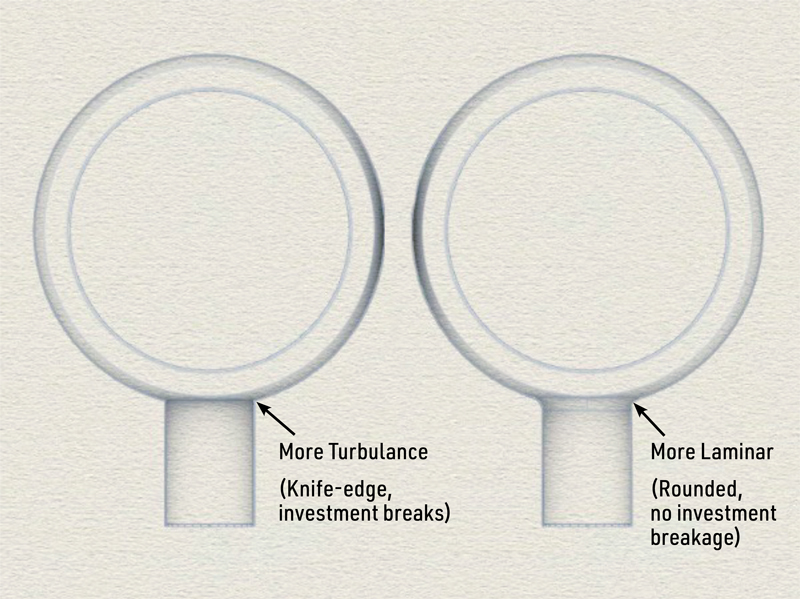
Sharp edges (left) can create a more turbulent flow of metal and result in investment breaking off and getting lodged in the model. Ideally, CAD designers should design rounded edges (right) to create a more laminar flow of metal.
For example, the image above shows two ways that a sprue could be attached to a band that demonstrate both a more turbulent connection as well as a more laminar one.
Think about the negative space in this example. That represents the investment surrounding your models. In the model on the left, a very sharp edge of investment is created where the sprue and the ring meet. Inevitably, some part of that sharp edge will break off, flow with the metal up into the mold cavity, and create an investment pit. If it gets lodged somewhere in the middle of your model, you may never see it and it may not be a real problem. But if it gets lodged somewhere on the surface, it will create a pit that you will have to fix in the clean-up process of finishing your ring. Or worse yet, it will lodge just under the surface and won’t show up until your client wears her brand-new ring for the first time…not a great impression of your work.
SubD and Quad Remesh
This same concept holds true throughout the modeling process. Let’s look at a design that is initially created using two stacked solids.
In this case I Boolean Unioned the two objects, and then using SubD tools did a QuadRemesh, which is a great and very fast way to create a more laminar flow in your cast objects.
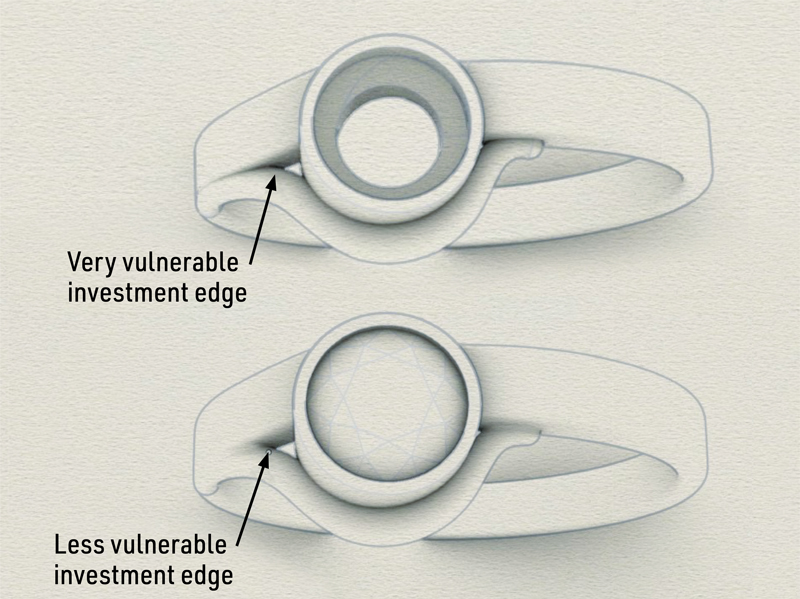
When stacking solids, Rhino users can use the QuadRemesh command to help create a more laminar flow in the model.
In the QuadRemesh command, you have a great deal of control in deciding how faithful to the original stacked polysurfaces you want to be through the quad count. Remember, even a small bit of filleting is helpful in the casting process. (Note: In the example above, prior to printing I would have also joined and converted to SubD the bezel with the rest of the ring. That would take care of the sharp investment edge that will form between the bezel and the ring in the current configuration.)
Filleting
Filleting is another way to make your designs more conductive to creating laminar flow during the casting process. Filleting simply means to round the edges of an object but can it produce unexpected results without a full understanding of how the command works and the sub-commands that exist within the filleting command itself. That topic is fodder for another whole article so I will leave a full explanation of how it best works to another paper. But if you’d like to learn more about filleting now, I have posted a brief instructional video about it on my website, click here.
Know Your Metal
Different metals have differing flow characteristics, differing solidification rates and, of course, different flask and casting temperatures for casting. Gold and silver are relatively easy to cast and model for, but platinum is very different so I’m going to touch upon what to watch for when modeling for platinum.
In the 2010 paper, “The Role of Process Parameters in Platinum Casting,” which was presented at the Santa Fe Symposium on Jewelry Manufacturing Technology, authors Dr. Ulrich Klotz and Tiziana Drago state that “Platinum alloys are a challenge for defect-free investment casting because of their inherent thermophysical properties, which are high melting point, high viscosity of the melt, high shrinkage during solidification, and low thermal conductivity compared to other precious metal alloys.” I’ll do my best to translate the data into a couple relevant points to consider when modeling for platinum.
Perhaps the two most important things to understand are the high shrinkage during solidification and molten metal flow.

A model’s sharp edges (left) can create turbulence in the metal flow. To help create laminar flow during the casting process, fillet the edges. In the example here, the cube’s edges have been rounded (right).
To mitigate the shrinkage issue of platinum, it is best to keep the cross-section of your model consistent throughout the model. In other words, try to avoid areas of high cross-sectional density adjoining areas of low cross-sectional density. I mentioned the difference between laminar and turbulent flow earlier and it is particularly important when modeling for platinum. Angles from acute to 90 degrees tend to shrink enough to pull back from the corner, sometimes even producing holes in the model at that point.
Viscosity of platinum alloys (the lower viscosity of an alloy, the better its fluidity) is the second issue and translates to form filling being a critical issue in most filigree-type designs.
Know What You Don’t Know
One problem that Tyler Teague mentioned in his 2007 Santa Fe Symposium paper, “Technical Model Making Part I” is, unfortunately, still true. In his words, “The standard CAD operators these days are typically younger and do not have much, if any, bench or manufacturing experience.” One of the best things you can do to improve the printability and castability of your designs is to spend whatever time it takes to get familiar with the downstream process that your designs will go through.
I have said many times that nobody should try to design jewelry, using CAD or otherwise, until they spend at least two years doing repairs. That may seem extreme but until you see what works, and what fails miserably, as an object worn on an active body, until you have that experience under your belt, you may indeed continue to make models that not only fail your customers but fail the industry at large.
I hope what I’ve presented here will help. Don’t stop learning, ever.

Know More
It’s not possible to sum up everything needed to know to create perfect printable and castable CAD models in one article. I highly encourage you to check out the resources below to learn more.
• For those who want to delve into the science of modeling for casting, Tyler Teague presented a paper at the 2007 Santa Fe Symposium (SFS) called “Technical Model Making Part I.”
• To learn more about the production standards for modeling, check out the Stuller Inc. website at stuller.com/cadcamservices, which has an excellent downloadable PDF on the subject.