

Tips for Improving CAD Design Presentation
Render Remodel
How to improve render images to effectively communicate your designs
By Darla Alvarez, GIA Jewelry Design & Technology Instructor
Renders are all about communication. More and more, we sell jewelry using photorealistic renderings, not actual jewelry photographs, especially with the rise of 3-D modeling in tandem with online shopping and social media. Clients must be enticed by and believe in the photorealistic rendering before they buy the physical piece. We will look at an initial render and then look at ways we can improve that image to effectively communicate the design.
A. The angle of the initial render shows the horizon line. This breaks the image into sections and can distract the viewer from your design. Consider changing the angle of the render, zooming in more on the model, or placing a surface backdrop to eliminate this distraction.
B. The initial render’s prongs are not adjusted to simulate set stones. Details such as adjusting prongs and bezels to appear “set” help a client visualize what a finished design will look like and make the design look more polished. Also, round all edges, if possible, for a more natural, photographic image. Fillet edges on a model prior to Boolean Union for best results.
C. Lighting is probably the most difficult aspect of rendering. Hot spots, such as the corner of the ring box and lid, are unflattering and can wash out design details, especially if other parts of the model, such as the ring, are dark. This harsh lighting or overconcentration of light is typically caused by smaller lights. To solve this issue, try using larger, diffuse lighting. If the overall lighting is good but an area remains dark, add a secondary light pointing only at that area.
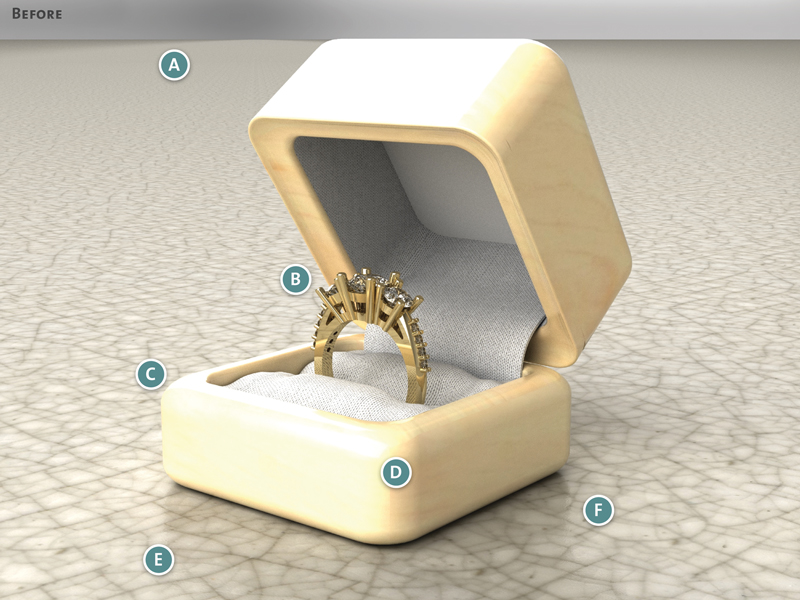
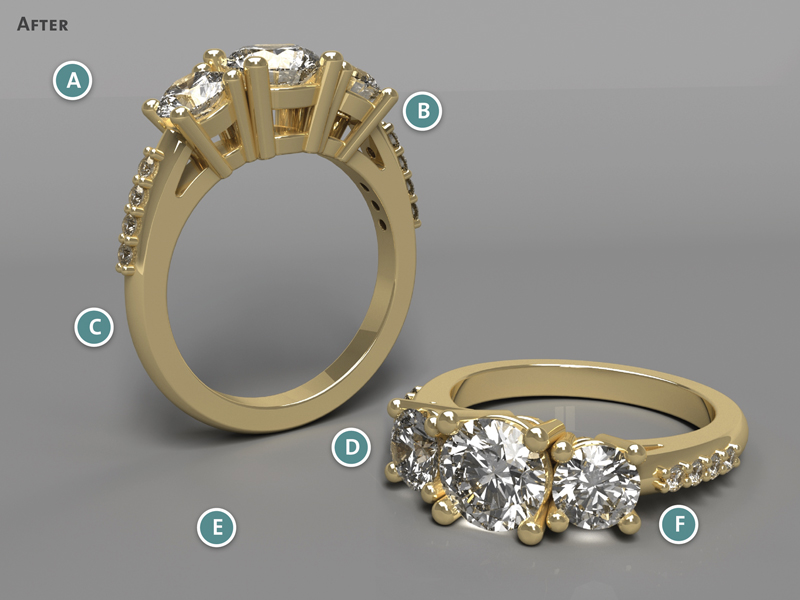
D. Jewelry props can lend realism to a render, but they can also inadvertently become the focal point, as with the ring box in the initial render. Props can still be used, but they should serve as support for the render and not compete for attention with the design or, worse, be more interesting than the design. If you are spending more time adjusting the render for the prop than the model, the prop should be removed. The jewelry should always be the star of the render.
E. Be cautious about using a ground plane with a busy pattern. A neutral-colored ground plane keeps the focus on the jewelry. This doesn’t mean that a patterned ground plane should never be used, but much like with props, if it becomes more interesting than your model, the ground plane material should be replaced. White ground planes are very popular but be aware that they can be difficult to light because they can cause hot spots on models. Limiting reflectivity on ground planes can also help avoid issues with hot spots.
F. Because the purpose of a render is to communicate your design, consider presenting your jewelry design to the client from more than one angle. Some jewelry pieces, such as rings, by nature need two views to successfully communicate the design. This can be done by adding a copy of the model in a different position, which gives your viewer more information about the design.