

A Guide to Getting Started in CAD
So…You Want to Work with CAD
Taking the plunge into computer-aided design
By Sharon Elaine Thompson
You’ve been looking at computer-aided design (CAD) programs for years, hesitating to make the commitment or wondering what all the hoopla is about. The past year, with so much business going online during the pandemic, might have made you look a little closer. But is it really worth it? And what are you getting into?
Why Move to CAD?
There are numerous reasons that jewelry designers have embraced CAD. One is the growing demand for custom design, says Shawn Montgomery, executive director, business development – global software and CAD/CAM services for Stuller Inc. in Lafayette, Louisiana, whether it’s a small change to an existing design or a total shank-to-prongs innovation.
Modern day consumers have taken the message of having it their way well beyond burgers. Perhaps as a result of the growing domination of social media in everyday life that has everyone showcasing every detail of their lives online, consumers are increasingly more interested in having something made that is unique to them. CAD offers jewelers a fast and easy way to create and deliver those unique items.
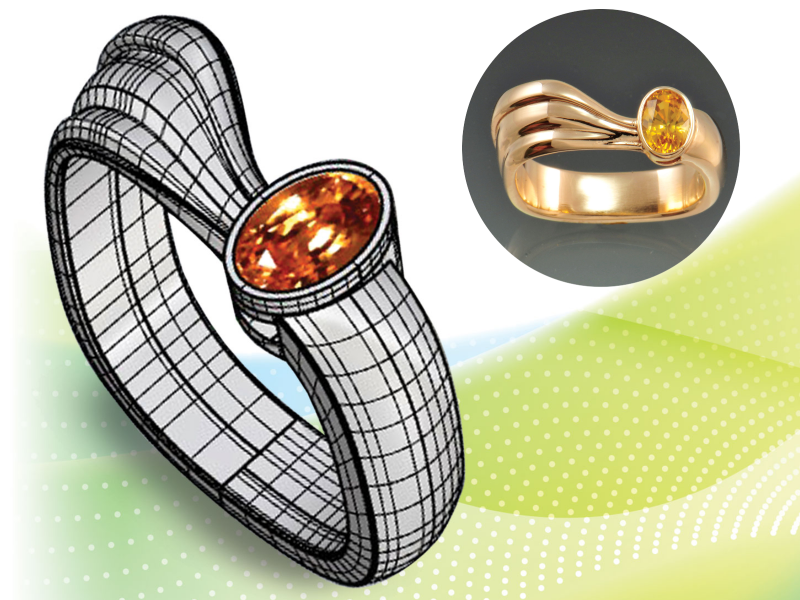
For example, if a customer wants only to modify a design, CAD speeds up the whole process, saving the jeweler time and money. If the design was originally carved in wax, “you might have to redo the entire model, losing all the time you have in it,” says Joel McFadden, principal in Jewelry by Joel McFadden in Chicago. “In CAD, you can change the de-sign quickly.”
Another benefit of CAD is its effect on a company’s bottom line. Precious metal and gemstones have always been the lifeblood of the jewelry industry. However, “the overwhelming expense of inventory, and the low turn rate, was strangling independent jewelers’ profitability,” says Montgomery, especially in the face of shrinking margins.
It can also help jewelers more accurately price their work. Whereas when bidding on either a wax carving or hand fabrication job, jewelers have to estimate how much metal will be needed for the project, CAD can indicate how much a design will weigh in different metals.
“CAD made custom work profitable,” says McFadden.
In addition, in a market demanding uniqueness and individuality, jewelers sometimes find that clients use their precious metal inventory as a—very expensive—three-dimensional idea book. As a result, some jewelers have embraced CAD as a way to move to a business model that doesn’t require precious metal inventory. Some use non-precious prototypes that mirror a digital inventory to sell custom and customized pieces. Customers simply choose a sample from the case and the jeweler alters it digitally to their specifications. There are fewer lost sales and lower inventory overhead.
Some jewelers combine a precious metal inventory with a virtual one, selling some items from the case but using a rendering program to create photorealistic images of their CAD designs to sell virtually either in store or on their websites. They don’t make the piece until someone wants to buy it, saving manufacturing time and costs.
The time savings CAD offers also can’t be overlooked. Whether you’re creating pieces for a line of jewelry, adding stock to inventory, or making custom work, you are often using and reusing the same or very similar elements, such as leaves or scrolls. By storing those elements in a CAD program’s design library, you can quickly reuse them without refashioning them by hand—and without a room full of rubber molds.
CAD also provides greater precision and accuracy. Whether it’s wax carving, working with Precious Metal Clay, or fabrication, it’s difficult to get the level of accuracy that you can with CAD. If you’ve ever spent hours trying to straighten lines, get curves right, or mirror one side of a model on the other, you might well come to love CAD.
Or consider a piece that has many identical elements placed with precision. In 2011, Tom Linenberger, owner of Goldworks in Fort Collins, Colorado, created a rhodolite and white gold ring titled “Armor,” a design that required 216 identical rivets. Knowing that small variations in hand-crafted rivets would not be precise enough to meet the standard he had set for the project, he created the tiny rivets—with their 0.5 mm diameter heads and 0.4 mm diameter shafts—in CAD.
Finally, there’s also the ease with which CAD can help close sales. CAD allows the customer to sit side-by-side with a jeweler while a piece is brought to life on screen. Feedback can be offered and changes incorporated immediately, speeding up the overall design process. Getting to be a part of the design process can be enticing for many consumers.
David Nygaard, a jeweler in Norfolk, Virginia, takes advantage of this possibility, calling it “the experience economy.” The idea is that the experience creates value. “If you’re going to spend time shopping, it has to be engaging, fun, and really grab you, pull you into that experience. That’s what we are able to do with this new technology,” says Nygaard.
In front of the computer screen, he works with his customer to design from his library. “We modify and change things and the customer loves it. We can put their initials in, or put their favorite flowers or pastimes in.” Then Nygaard sends them to have lunch, or they return the next day and he shows them a 3-D printed model. This usually clinches the sale.
Using CAD in this way can increase your profit and your sell-through as well, says Montgomery. “Price becomes secondary, as does shopping around, because [the customers] are involved in the experience.”
The Options
Once you’ve decided to invest in CAD, what are your options?
Two of the most common CAD programs used within the industry are Rhinoceros 3D, affectionately known as Rhino, and Matrix. Rhino is a broad-based industrial design CAD program used to create everything from cars to phones to jewelry. Matrix was originally designed by Gemvision Corp. specifically for jewelers. Built on a foundation of Rhino, Matrix was created to give jewelers single-mouse-click ways to design with the elements they need: stone shapes, setting styles (such as heads or bezels), and shanks. (Gemvision was later purchased by Stuller, and Matrix has been combined with RhinoGold to create the new MatrixGold.)
There is also CounterSketch, a simpler program from Stuller that comes with a built-in design library. By using mix-and-match elements, jewelers can design and sell right at the counter. CounterSketch gives you the cost of the finished piece, and the design files are sent electronically to Stuller, where they are cast and completed in a truly one-stop manner.
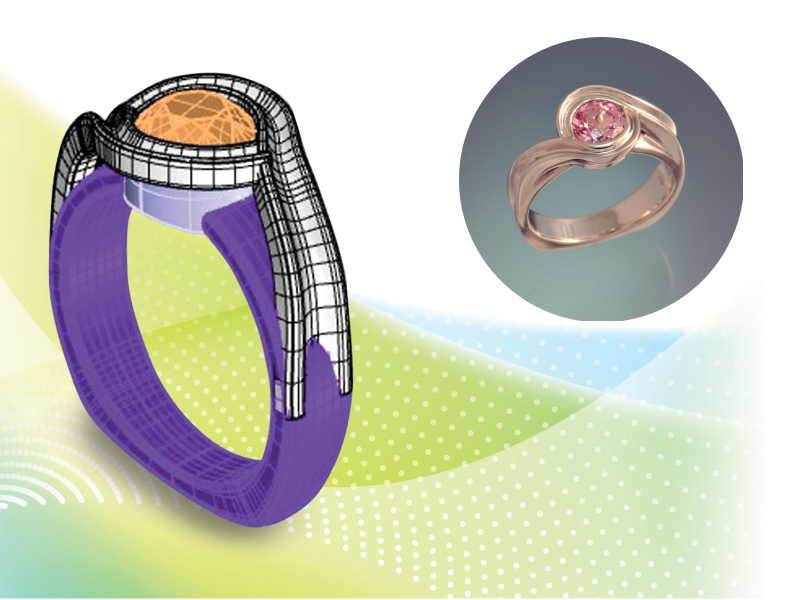
CounterSketch is for jewelers who want to be able to offer customized jewelry to their clients but have neither the time nor the inclination to commit to learning a more in-depth CAD program. It has the shortest learning curve, says Montgomery, and a jeweler “can implement the program and start selling immediately.”
However, a different jeweler, says Montgomery, with experience hand carving waxes, “may want to start with MatrixGold, if they want to accept the hurdle of the learning curve, which is longer. Those jewelers want to be able to make anything.”
When trying to decide which program is right for you, it’s always helpful to ask your peers about the program they use and why, as jewelry designers tend to be particular about their choice in CAD software.
Lee Krombholz, owner of Krombholz Jewelers in Cincinnati, Ohio, started with JewelCAD, but “within a year, I ended up thinking it would not be my long-term program,” he says. He next turned to Rhino because of the higher cost of Matrix. “It worked well. But Matrix did such a great job with the builders, within six months of working with Rhino, I took the leap and bought Matrix. I’ve never looked back.”
However, he notes that he also uses CounterSketch in his store. “It’s a great way for the average person to be in the CAD world without entering the MatrixGold world,” he says. “Its controls are such that you can’t make a mistake, and if you do, Stuller, on the production end, will correct it.”
Darla Alvarez, senior instructor in the Jewelry Manufacturing Arts program at GIA in Carlsbad, California, moved in the other direction. “I used Matrix for about 10 years before shifting to an all-Rhinoceros 3D workflow when Matrix was reworked into MatrixGold,” she says. “The pluses to using a jewelry specific program like Matrix is that a new user can quickly learn to generate jewelry models without much experience in CAD” because the built-in libraries and creation tools require minimal input from the user.
“The minuses to using these programs,” she adds, “is that the user never really learns how to do CAD, only learning how to do CAD within the confines of the jewelry specific tools. In other words, creation can quickly become limited to the program’s stock models. Also, if a jewelry specific tool cannot give the look a client wants, a user will have a difficult time creating it themselves because the user will not have enough knowledge of the CAD tools outside of the program’s builders.”
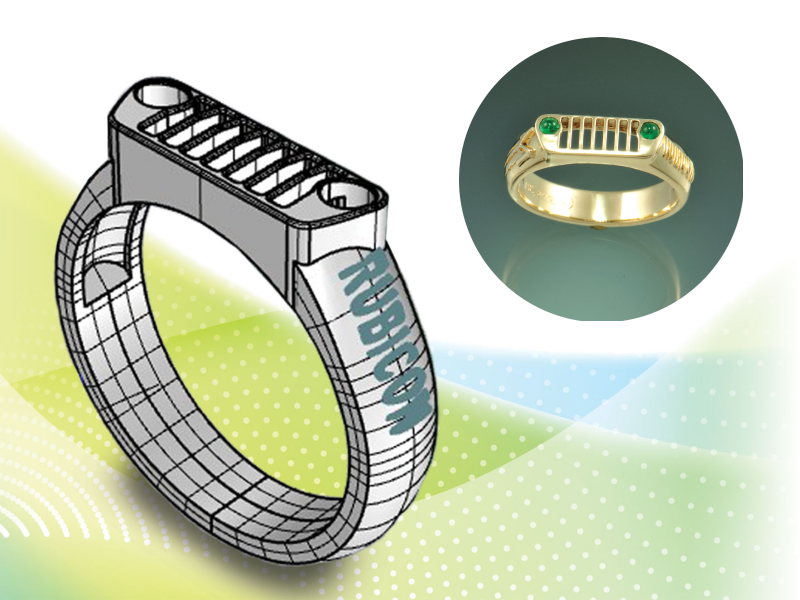
With a growing number of consumers interested in having something made that is unique to them, CAD offers jewelers a fast and easy way to deliver those unique items.
Gary Dawson, principal at Gary Dawson Designs in Eugene, Oregon, prefers Rhino for the same reason. If everyone is using the same builders that are available in jewelry-specific programs, he says, there’s a risk that everyone’s work begins to look similar. Dawson prefers the freedom to create something that is unique to his pieces. “I don’t want someone else’s builders getting in my way. I want my prong head to look like mine, not every other user’s prong head.”
“It’s primarily a Rhino-based world,” says early Matrix-adopter McFadden.
Alvarez agrees. “The jewelry industry still relies on programs built on Rhinoceros 3D, so it would be best to invest in either Rhinoceros 3D or a program that uses it because that is the industry standard.”
When Dawson started shopping for a CAD program, he says, the jewelry designers he respected most were using Rhino, which was a good indication that that was the program to choose. Also, he says, because he knew these designers, “it seemed like I had a better opportunity for mentorship.”
(There are other CAD programs not based on Rhino that can be used by jewelry designers. In addition to JewelCAD, designers can use Zbrush or Fusion 360 from Autodesk, as well as 3Design.)
“One of the criticisms of Matrix and Rhino has been that it’s very easy to fall into symmetry and robotic things,” says Dawson. This has been solved by a variety of plug-ins that allow organic modeling of surfaces. MatrixGold uses Clayoo; Matrix formerly had T-splines. Rhino has SubD built in. And CounterSketch has Freehand, which provides additional design flexibility.
GIA teaches Rhino in conjunction with ZBrush, a digital sculpting program. Though ZBrush is a non-Rhino-based program, says Alvarez, “we look at ways to make objects directly in ZBrush, but we also learn how to take files out of Rhino and import them into ZBrush and vice-versa.”
The beauty of having an organic modeling option built into a program, as SubD is into Rhino, “is that there is only a small learning curve,” says Dawson. “You use the same commands, the same control points and manipulations that you use in Rhino. It’s not a huge learning curve if you’re comfortable with Rhino.”
It’s worth noting that each of these modeling capabilities works slightly differently. Krombholz has not upgraded his Matrix to MatrixGold because he has come to rely on T-splines. “I do almost all my designing in T-splines,” he says.
What Will It Cost?
When deciding which CAD software to invest in, jewelers need to consider the costs not just of the CAD program itself, but any additional equipment that may be needed to run it.
The costs for CAD programs vary widely, from Rhino’s $995 to CounterSketch’s $5,500 to MatrixGold’s $7,900. A perpetual license for ZBrush is $895; JewelCAD is $3,885. Fusion 360 by Autodesk runs $495 a year. Some programs offer free trials ranging from one to three months. Many offer monthly subscription options as well. All offer varying schedules and pricing for updates.
You’ll also need a computer that can handle the size of these programs and the files you’ll eventually be saving. A computer with the drive size, video card, and power suitable for gaming is suitable for CAD, says Montgomery. But check the requirements of your chosen program carefully.
And be sure you have the right type of computer. For CounterSketch perpetual (which is downloaded onto your computer directly rather than stored in the cloud) and for MatrixGold, you will need a PC, not a Mac, says Montgomery. Rhino works on either a Mac or PC.
If you have to invest in a new system, consider buying more computer than you actually need, says Alvarez. “If the minimum [requirement] is 8 GB of RAM, get 16 GB. When CAD programs post minimums, they really are minimums and they will not give the user optimal results while using the software.”
Doing this can extend the life of the computer, too, she says. “If a computer has hardware beyond the minimum, barring a significant software change that requires different hardware, which I have never experienced, a computer can easily last five years or longer.” She also believes that desktop models last longer than laptops.
Alvarez also recommends getting two monitors. “Make them a reasonable size,” she says, “probably at least 20 inches. It is much easier to do CAD with one monitor dedicated to the program and a second monitor for client notes, design pictures, e-mails, or even for CAD instructional videos so a user can model along.”
And remember your back-up system. “It is incredibly important to back up those files frequently, whether it is to a cloud storage service or an external hard drive,” says Alvarez. While CAD files are not tangible, she adds, they “represent time and there is no way to get that time back if those files are lost.”
Dawson agrees. “Back up, back up, back up,” he says. “I have at least three backups of everything I’ve done. I have two separate external terabyte storage drives.” He also has two computers he designs on and regularly backs up designs from one to the other. “If I have a computer failure, I won’t be dead in the water.”
How to Learn CAD
If you were an early adopter of computer technology or enjoy messing with computers, you may want to try to teach yourself. Krombholz, McFadden, and Dawson all started this way. However, for most jewelers interested in CAD, structured training is the wisest path and there will be additional costs for that.
You can find free videos online, of course. “While many people rely on YouTube,” says Alvarez, “random videos by random users result in random information that may or may not be good. I’ve learned that using training materials provided by the program itself are the most useful.”
“I’m a big advocate of tutorials,” adds Krombholz, who also recommends finding a good user group.
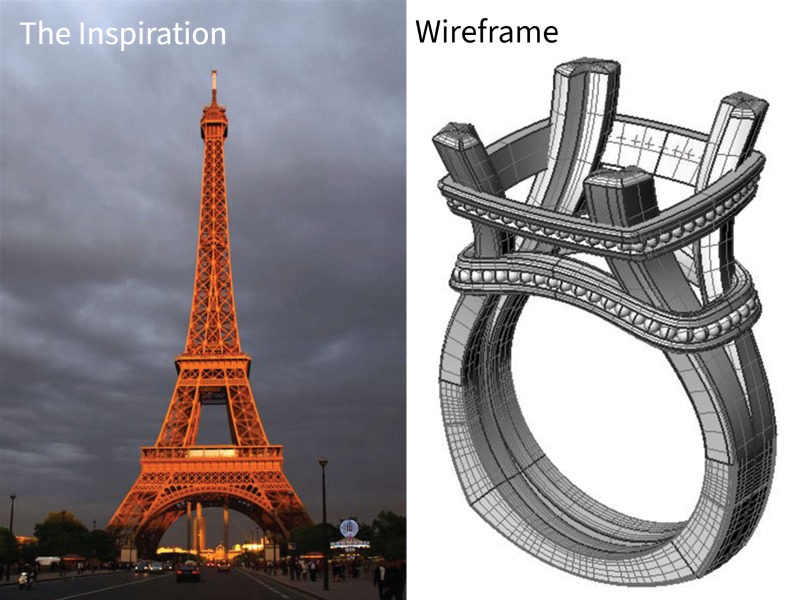
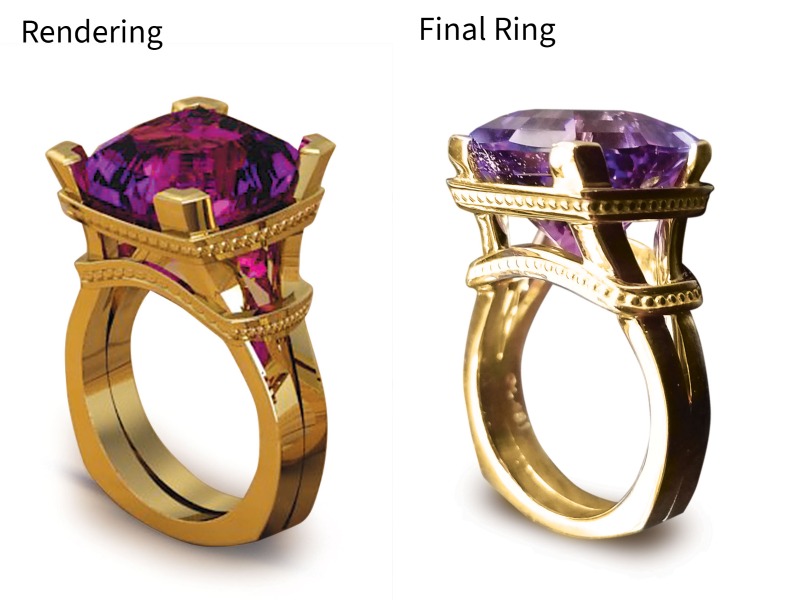
One of the advantages of CAD is the easy ability to make changes to a design. If an initial design doesn’t quite meet the customer’s original vision of the piece, the designer can modify the design on screen. Whereas with a wax carving, a new model would have to be carved, “In CAD, you can change the design quickly,” says Joel McFadden.
Online or in-person classes are offered by Rhino and Stuller (which may be included in a purchase package or may have to be purchased separately). You can also get industry-specific training at GIA, where Alvarez teaches Rhino and ZBrush, or at an art school, such as the Portland Jewelry Academy, where Dawson teaches Rhino. Don’t overlook colleges and universities around the country, such as the Savannah College of Art and Design in Georgia, that may teach CAD skills. Those that do, most often teach in Rhino, as Rhino can be used across many industries. Also, be aware that in most community colleges or universities, you won’t be using jewelry-specific software unless the school has a dedicated jewelry program.
Before you even start CAD, however, Alvarez recommends getting a good grounding in computer skills. She came to CAD from the bench. “I wasn’t much of a computer user prior to doing CAD. Having basic computer skills and an understanding of the inner workings of a computer, both hardware and the inner systems, such as Program Files, would have been helpful. In fact, this should probably be the starting point for learning CAD: learning the basics about computers.”
Even if you think you can learn by doing, Dawson has a cautionary tale. “When I first started learning CAD,” he says, “Rhino seemed intuitive enough to me that I could basically click around and get stuff to work. I did that, and I got it to be productive. I got good enough to be asked to teach it by Portland Jewelry Academy.”
But Dawson decided to get accreditation by Robert McNeel & Associates, the developers of Rhino. They insisted that Dawson, who would have ranked his skills at an intermediate level, start at level one training.
“My mind was immediately blown by how much, how rapidly my workflow improved, and how much faster I could get done what I wanted to do.” Rather than having to take the long way around, he learned which commands would more directly do exactly what he wanted. “I wish I would not have been such an independent, strong-willed learner. I wish I would have sought professional instruction right away.”
Practice Makes Experienced
CAD skills are like any other: they’re learned with practice. In Dawson’s classes, he recommends students put in at least an hour a day outside of class. “If you approach it with a disciplined course of study, you realistically could, in two to three months, begin to be productive,” says Dawson. “If you just click around, it could take a couple years.”
Krombholz, who taught himself to use CAD by making persistent use of tutorials and through trial and error, says, “For two or three years, I would come home from work, and spend two to three hours practicing and learning Matrix to get to the point that I was able to use it and benefit from it.”
Alvarez, who did not have outside training in CAD, and who balanced her learning with working on the bench, says it took her “about three years before I felt comfortable that I could take on most any project in CAD. This should not discourage a new user. I still made pieces while I learned. I was just not confident I could handle most any CAD project I might get, initially.”
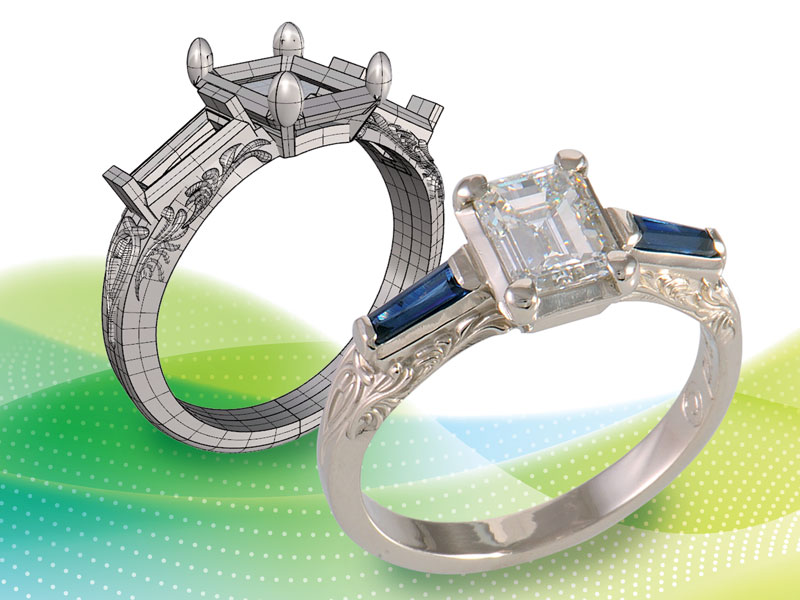
CAD is an incredible tool for making your business more profitable, but like many things in life, it takes time and commitment to learn.
Alvarez believes that “the real key to learning CAD is to regularly do it. Working forty hours in CAD for a week and then not using it for two months is not as useful as working in CAD five hours a week for two months straight. Fighting knowledge regression is constant when first learning CAD, and skills learned one day can easily be forgotten the next.
My suggestion would be to spend at least an hour a day practicing or, if that is not possible, perhaps two hours a day twice a week. Binge sessions of 8 to 10 hours will result in fatigue and will negatively impact knowledge retention. I would avoid trying to cram learning into large blocks on the weekend, something a new user may be inclined to do.”
Prepare for Frustration
Even jewelry-specific CAD programs are not point-and-click automatic. The computer adage GIGO—garbage in, garbage out—holds just as true here as elsewhere.
“A new user will be able to create simple shapes quickly [in CAD], which will feel great,” says Alvarez. But frustration lies just ahead. “Be patient,” she says. “CAD is just as much a hard skill as being a goldsmith. Some people think that, being on a computer, one need only click a few buttons and a ring appears. This is far from true.
“It isn’t that the tools are hard to learn,” she continues. “It’s actually the troubleshooting that makes CAD challenging. Learning the nuances of why a process fails and being willing to play detective is what I believe frustrates most people. In addition, learning to work around an error is important, too. I’ve noticed new users will keep trying to do the same thing over and over instead of just doing it a different way to get the same result.”
A big problem is that beginners tend to overbuild, trying to work too much complexity into too small a space. A 2 mm element on screen can look like there is a lot of design real estate, but that’s deceptive.
“You can work large on the screen,” says McFadden, “and add a lot of detail, or those delicate prongs, but when you bring it down to ring size, the detail disappears. It’s a huge problem.” It can result in a ring with prongs three-tenths of a millimeter in diameter.
This is particularly a problem for those who are coming to CAD jewelry design without bench experience. With bench experience, “you have an understanding of the production and how jewelry has to work,” says McFadden. It helps to think of CAD/CAM as “an automated wax carving tool.”
“It’s hard to understand the engineering of shank width, prong sizes, or the overall scaling without measuring things at the bench all day,” adds Krombholz.
Even if you plan to send your printing work out, it can still be a good idea to invest in a 3-D printer for learning purposes. “What is on the screen is what you get, and it may not relate well to a 3-D printed object,” says Dawson. “You can learn CAD and send stuff out, but your models may be rejected because they are not castable. Structural integrity isn’t there.” Worse, the model may be castable, but due to unfamiliarity with the additive manufacturing process, the model bears no relationship to the design you think you made.
Before he had a 3-D printer or mill, Krombholz says, “I’d do a CAD design and send it to the printer, and it would come back not usable.” It was an expensive and frustrating process.
Krombholz recommends having a 3-D prototype printer on premises. With that, you can be sure the final model has the right feel and is scaled correctly. If a printer isn’t initially in your budget, you may want to look to partner with an experienced jeweler who has a printer or mill.
“The best thing I did,” says McFadden, “is that I worked with Mark Williams, a friend who had a mill. He would say this is a problem with a model or this is too sharp a turn. CAD modelers need to work with a casting house that knows what they’re doing. You’ll learn a lot from that.”
In addition to helping educate designers about what can and can’t be printed and cast, having a prototype printer is a great way to show to a client what the piece will look like in 3-D rather than in a rendering, says Krombholz. They can even try on the model.
CAD is an incredible tool for making your business more profitable, but like many things in life, it takes time and commitment to learn. You need to be prepared for the frustrations that will come along the way. But with patience and perseverance, success will be yours.