

The Whole Picture: Part 3
Tips for photographing Jewelry
By Matthew Perosi
Editor’s Note: This is the final column in a three-part series that provides tips and guidance for photographing jewelry. Read Part 1. Read Part 2.
Product photography takes a lot of time, especially when you have hundreds of items to shoot for your website. Even with my experience using DSLR cameras, it takes me at least 10 minutes to take and quickly crop a single photo. Those 10 minutes can quickly turn into 30 when you want three different points of view for each product. And those 30 minutes will turn into seven weeks if you’re building a small website with only 500 items.
Smartphones may help to speed up the process. Offering speed and convenience, smartphones have evolved to the point where they can now take jewelry photos that look as good as DSLR photos. I’ve spent the past year testing ways to take smartphone jewelry photos and while I couldn’t match the DSLR quality that’s still needed for print media and billboards, I was able to take great smartphone photos that could be used for social media or e-commerce websites.
In the final column of this three-part article series on photographing jewelry, I’ll explain my current smartphone process and give you my best recommendations for taking smartphone photos.
DSLR vs. Smartphone Settings
In the second part of this article series, I explained lighting, depth of field, aperture, and film speed that could all be controlled on a DSLR camera. Smartphones don’t have the same versatility so you can’t as easily control aperture or film speed with the built-in camera apps. Some third-party apps offer control of these settings, but not to the degree of a larger camera.
On a DSLR camera, you can usually set your aperture between f/1.4 and f/36, depending on your lens, with the smaller f-stop number yielding a smaller depth of field. The best photos in DSLR photography will always come from f-stop settings of f/16 or higher because that’s what you need for the good depth of field to have your jewelry fully in focus.
The current Android and iPhone models have a fixed aperture of f/1.7 or f/1.8. With f-stop settings that small, the laws of physics simply won’t allow for the large depth of field needed for your jewelry to be fully in focus. At best, all your smartphone photography will show is a small portion of your item in focus, such as a few pavé diamonds or facets of a large gemstone.
Smartphone Lighting Box Options
Smartphone photography is an attractive alternative to DSLR camera photography because it’s easier and more convenient. Most jewelers I speak to at trade shows would rather spend money on a new smartphone and figure out how to get a good photo using an inexpensive setup than to invest in a DSLR camera and an expensive light box or lighting setup. Financially, this makes a lot of sense.
Smartphones have made advancements with their built-in flashes, but the light that comes from a phone can be really harsh because it creates strong shadows that block background detail while overexposing other areas of your jewelry. Don’t use your built-in smartphone flash or try to use any external flash. Instead, use some type of enclosure that is lit with white LEDs.
Although you can use any light box with a smartphone, I realize that many jewelers and designers are looking for low budget smartphone options. An online search for “LED light box for product photography” will yield dozens of different boxes priced under $200. I decided to evaluate one such option, the Shibusa Studio (Figure 1). Its portable design is similar to many of the others you’ll find in the same size (11 inches) and price range ($60). While I’m not 100 percent happy with this foldable plastic box, it’s the best low cost box I could find to take website jewelry photos with white backgrounds.
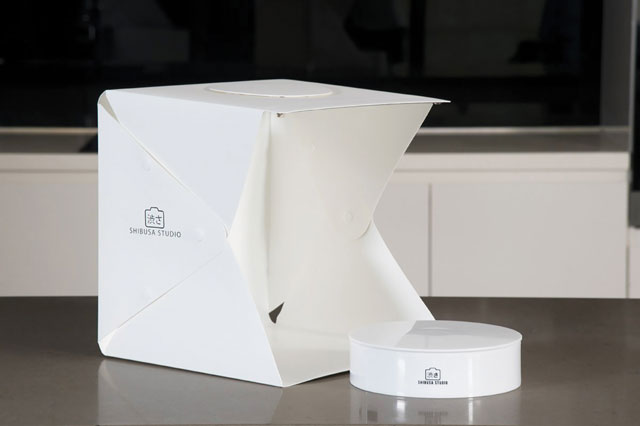
The big drawback of the Shibusa Studio, and all the other boxes of similar design, is its three-sided construction with one open side to allow for easy manipulation of your product and placement of your camera at any angle. The more expensive boxes normally used with DSLR photography usually have doors and pre-cut holes for your camera lens. When it comes to jewelry photography, every opening in your light box will create a black reflection on your item. Small openings for your camera lens usually look like a dot, but large openings will create very large black lines and shapes on your reflective jewelry.
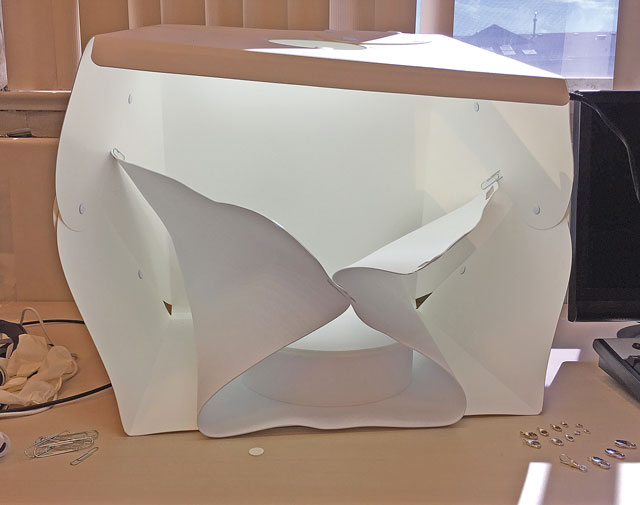
Figure 2 shows how I set up my Shibusa Studio using the turntable as my shooting platform and the supplied white background as a mask to cover the open side as best I could. Alternatively, I could use white paper or a white sheet to cover the large opening and cut a hole through it to mimic one of the fully enclosed boxes. The setup doesn’t look professional, but for the moment this LED box is the best option for the price until something better comes along.
Avoiding Reflections
One of the biggest problems with smartphone photography is the unavoidable reflection of your hand as you hold the phone. This is a new problem we don’t see with DSLR photography if we are shooting through a hole in the side of a light box. With smartphone photography you have to hold your phone close enough to your jewelry that your skin tone and the color of your camera case will badly impact the true color representation of your jewelry. While this color bleed is fine for social media, it’s not good for online catalogs where you need to show the real color of an item without any reflection.
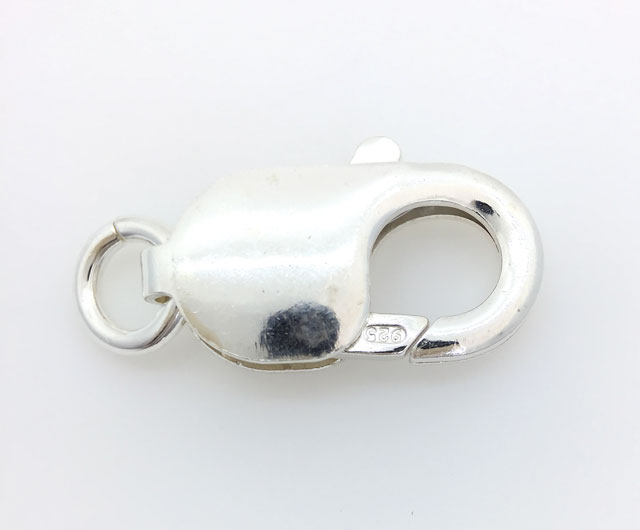
The polished white gold lobster claw shown in Figure 3 was very difficult to photograph. The black dot you see on the main body of the piece is the macro lens I attached to my smartphone. Look carefully and you’ll see two black lens reflections on the claw itself. Other than the black reflections, the white metal color is accurately represented. To get this photo, I was wearing white latex gloves and a long sleeve white shirt. I actually had the latex glove pulled over my wrists to prevent any reflection.
I positioned the lobster claw on the turntable so that I would not see any other large black reflection and I held the camera through the center opening as shown in Figure 2. I thought about using one of my many small smartphone tripods to hold the camera in place, but they are all black and would create further reflections on this item.
Macro Lenses
Most current smartphones have rear cameras that are approximately 12 megapixels. By comparison, the current DSLR cameras are 24 megapixels or higher. The low aperture of f/1.7 also makes it difficult for you to get an up-close, in-focus photo. My newest smartphone has a 2.5-inch minimum focal distance. Figure 4 shows an eternity ring taken using my smartphone’s native lens. That is the closest that you could get without any lens attachment.
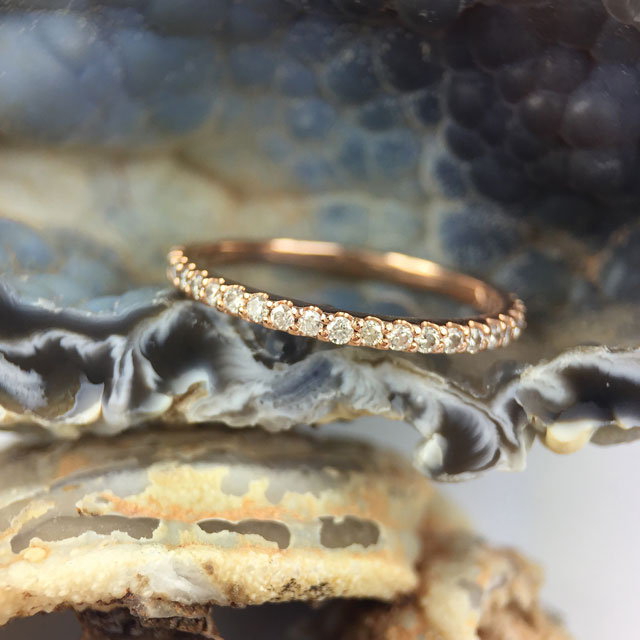
Although Figure 4 looks good from a distance, when you zoom in on a computer screen you’d realize that only a few diamonds on the top are in focus. Also, the texture of the geodes in this photo helps demonstrate the very shallow depth of field that smartphones have. This photo would be a good example of what you could post to Instagram, but not on your e-commerce website, where white backgrounds are important.
Jewelry photos on your website need to show more detail than what you see in Figure 4. Don’t be tempted to zoom in and crop the image on your phone just to make it look bigger; that only results in a larger blurry version of what you already have. Instead, you have to use a macro lens attachment on your smartphone in order to show more detail.
Many companies make macro lens attachments for smartphones. I use the Olloclip brand for my iPhone that is available at the Apple Store. They are about $80 for a 4-in-1 set. When it comes to lenses, you really get what you pay for so avoid anything that’s less than $50. Most kits will include several lenses. My lens kit came with a 7x macro, 14x macro, and 21x macro.
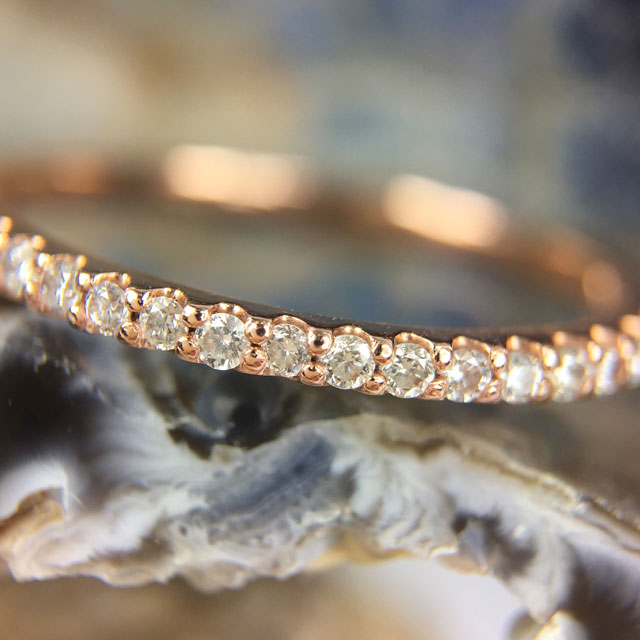
Figure 5 shows the same eternity band using the 7x macro lens on my iPhone. I didn’t zoom in on this photo; I simply cropped it to the same size as Figure 4 so you could see the focal difference between the two photos. Notice how there are only three perfectly in-focus diamonds and the rest quickly go out of focus. Once again this is the drawback of a smartphone with f/1.7 aperture that yields a shallow depth of field. Artistically, Figure 5 is beautiful for Instagram, but your website customers would prefer you use the 7x lens to take different photos from a few angles.
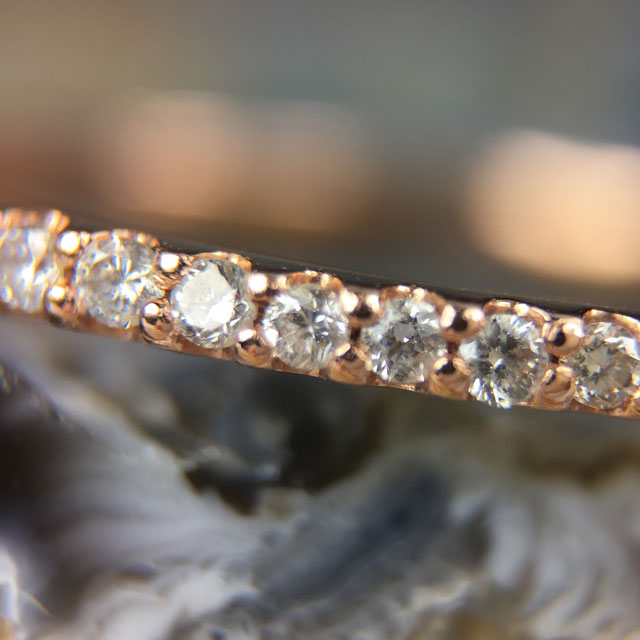
The photo shown in Figure 6 was taken with the 14x macro lens. Although we can see the details of the diamonds and the setting, this level of zoom has a very shallow depth of field that I don’t recommend for your catalog website. On the other hand, this level of zoom would surprise and capture the attention of most Instagram users because they rarely see jewelry this close. For your website, I recommend that you avoid any 14x or higher macro lens and stay in the 7x to 10x range.
Smartphone Apps
The efficiency of your smartphone photography will improve over time as you develop a process for taking and editing photos. Editing photos on your smartphone will be faster than transferring them to your computer for touchups. Photography projects can sometimes take four to nine months when you have hundreds of products. The aesthetic of the first photo you take should be similar to that of the last one you take nine months later.
A change in your workflow could ruin your entire website aesthetic. For this reason I recommend that you use the same smartphone for the entire project, and I do not recommend using any special photography app. Instead, I recommend using Google’s Snapseed app for your photo editing because it’s free and will likely be supported by Google for many years. While they offer fancy features, professional photo editing apps can cost as much as $100 and they will likely become defunct every time you upgrade your smartphone, which means you’ll have to repurchase the latest version. Try using Snapseed before paying for any other photo editing app.
Filtering and Sharpening
Your photography should accurately portray the color of your jewelry so you should never take or apply any fancy camera filter. Applying a color filter is fine for an artistic Instagram post, but not for your website.
Always compare the color of the captured photo to how you see the real item, then adjust the hue or saturation of your photo if it doesn’t accurately portray the real color. Be very careful not to over-adjust the colors because that leads to customer disappointment when they see the item in person. Make sure to double-check the brightness on your screen, and set it all the way up, while adjusting the colors, or you won’t see the image colors accurately. Smartphones often change the screen brightness without you realizing it, so be sure to double-check it often.
Even with the best macro lens and lighting, all photos seem to need a little extra “sharpening” and “structure” to bring out the very fine details. You can find these sharpening features in the “Design” area of the Google Snapseed app. Don’t over-sharpen the image, or it will begin to look unnatural.
Tripods
Just like DSLR photography, smartphone photography will take a long time. Your hand will begin to hurt if you hold your smartphone in one place for too long, making a tripod a worthy investment. However, don’t buy one until you figure out exactly what type you’ll need. I own several standard-size tripods for my Canon camera that are too big to use with a smartphone. I had to figure out what smaller, smartphone-specific tripod I needed before buying one.
As it turns out, I’ve needed different smartphone tripods depending on the jewelry I was shooting. One of the tripods is lightweight and good for holding my phone steady when shooting hanging necklaces and earrings, but another one is heavy so I can tilt the phone almost horizontally without it toppling over. I didn’t know what type of tripod to buy until I spent a few minutes holding it by hand to see what angle and position I needed. Remember that the focal distance from your smartphone to your jewelry won’t be more than 2.5 inches when using a macro lens, so you’ll need a tripod that can position your phone without also casting a shadow. My best smartphone tripod has extremely flexible legs that allow me to position the phone anywhere.
Final Thoughts
I expect my smartphone photography methods will continue to evolve as new technology becomes available. Unlike DSLR photography, which requires a large equipment investment, the smartphone lenses and light boxes are easy to acquire and are good enough for today. I’d like to see the jewelry industry get a fully enclosed, mini photo studio with built-in LEDs on the top and on the bottom, but until one of those is invented, I recommend that you make the minimal investment I explained here and start building your e-commerce site now.