

Subdivision Modeling in Action
Mike Magee demonstrates how he creates freeform custom designs
By Peggy Jo Donahue
Custom designers who use CAD love its precision, which produces final models that manufacture well. However, many of these programs rely on 3-D surface modeling, which is typically based on NURBS (Non-Uniform Rational B-Splines). Creating a NURBS surface is, in a way, like putting up a building using girders and later adding walls and windows: points of elevation (girders) are defined as curves, and then surfaces are lofted between the curves. The process works fine for most geometric forms, but it doesn’t always provide the flexibility needed to refine organic or freeform designs. (Imagine trying to change a girder after it’s been erected.)
To resolve this, some CAD designers have turned to subdivision modeling, which was first developed in the animation industry. Subdivision modeling allows very complex shapes to be created out of polygons rather than points; designers can tug and pull the polygons as they would clay, making subtle changes as they shape and smooth out the design. Used in combination with NURBS-based programs, subdivision modeling offers a designer a new tool in exploring creative possibilities.
What does subdivision modeling look like in action? To find out, we turned to jeweler Mike Magee of Dolmen Metalworks in Little Canada, Minnesota. To achieve organic shapes, Magee relies on a plug-in called T-Splines, which is available for the CAD programs Rhinoceros, SolidWorks, and (later this year) Gemvision’s Matrix 7. [Editor’s Note: Jewelry-specific subdivision modeling is also available in the 3Design program from Vision Numeric, through a plug-in called 3Shaper.] Magee has been using T-Splines in Rhino for almost a year, and his design “Bee Bat Ginkgo” was awarded best jewelry model in the T-Splines 2010 modeling contest.
On the following pages, Magee described how he used T-Splines to create “Bee Bat Ginkgo,” and why it was critical to his ability to execute his vision.
The Design Process Begins
When Joan Carter, a family friend, approached Magee to create her wedding band, she showed him her simple vintage engagement ring and asked him to create a complementary ring in the Art Nouveau style. After looking at pictures of the art, architecture, furniture, and jewelry that Joan was fond of, Magee came up with a swirling ginkgo motif for the ring (below).
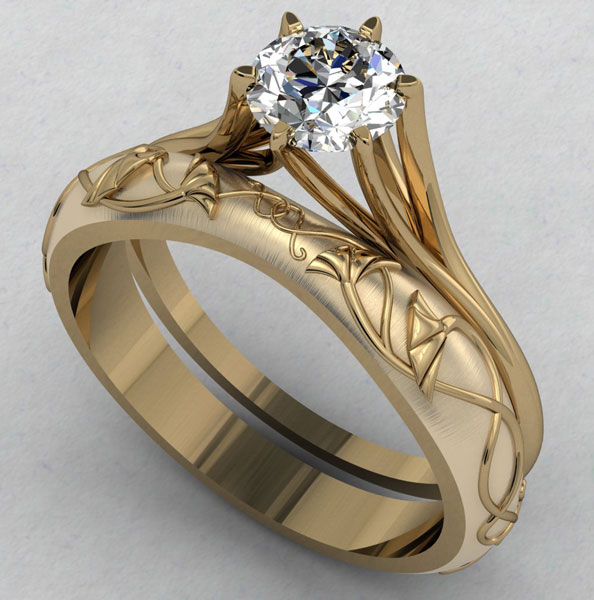
But when he delivered the first renderings, Joan asked the jeweler: “Could we take this design and push it to be more ’out of the box’? I love how artists from that era could take a mermaid being swallowed by a dragonfly and somehow make it beautiful,” she said.
It was right around this time, says Magee, that he was first trying T-Splines. A CAD designer who also teaches students to use Matrix at a local college, Magee was intrigued by what the plug-in made possible in terms of organic design. It gave him the incentive to take up Joan’s challenge.
In brainstorming a more “out there” design, Magee considered the aesthetic of the Art Nouveau style, which commonly incorporates natural themes in unnatural ways. Because Joan still liked the ginkgo leaves, he knew that’s where his new design would start. Magee created two ginkgo leaves on the sides of the ring, then had them morph into two “bat wings,” which in turn transition into two more ginkgo leaves with their stems nestled under a central scarab beetle (which Joan eventually asked him to change to honeybees).
Magee chose his elements carefully: Insects, bats, and ginkgo leaves are all commonly seen in Art Nouveau designs, and most symbols had hidden meanings for the people of the time. “Honeybees, for example, are a symbol for prosperity, while the bat signifies good luck, and the gingko leaf is a symbol for longevity,” says the jeweler. These messages all worked well for a wedding band.
After getting Joan’s approval of an initial pencil sketch of his new design, Magee imported and scaled the sketch to the length he wanted for the ring, using Rhino 4.0 and Matrix 6.3. He then moved into T-Splines 2.3 for Rhino to create each of the major design components. (Note: The company released v. 3 of the software in April 2011.)
T-Splines in Action
To create the bat wing/ginkgo leaf motif, Magee started with a cube in T-Splines. He then started stretching, adding to, and bending the cube, making the first arch of the bat’s wing.
“In NURBS, if you’re doing a design from scratch, you have to have a shape in mind, and you [create] a geometry based on lines, curves, and surfaces,” says Magee. “With T-Splines, you start with an object [like the cube], then grab it by its face or an edge, and pull, push, tweak, and create the shape you want—almost like molding in clay. T-Splines changes your workflow. It’s iterative design versus linear design. You don’t have to have it completely plotted out first.” The one drawback the jeweler sees? “It’s easy to get carried away when designing in T-Splines—you have to remember to truth-check designs, because they can get too thick or too thin quickly.”
After he finished molding the first cube, Magee created a second cube and extended the bat’s wing, then kept adding and arching cubes until the wing and its ribs transitioned into the ginkgo leaf. Along with the freeform creativity possible in T-Splines, Magee also loves the way the modeling software allows for the easy creation of branching objects—such as those seen in his bat wing.
In the image below, Magee’s T-Splines drawing overlays the right side of the pencil sketch approved by the client.
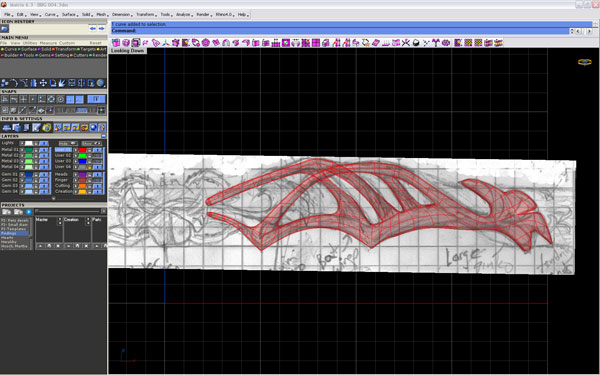
“In traditional modeling, it’s really difficult to pull off a branching tree, or the branching of ribs, for example,” he says. But in T-Splines, you can blend intersections into branching objects that look really natural. I found T-Splines particularly useful in crafting the smooth-flowing junctions of the organically branching and recombining sections of the bat wing.”
The Design Comes Together
Magee’s design is much more developed in the screenshot shown here, making it possible to now see the honeybees that decorate the top of the ring. (A pink T-Splines polygon is also visible—more about that later.) Magee created two honeybees that were crossed in profile, in the “rampant” position typically seen on animals such as lions, when they’re depicted on heraldic crests or shields.
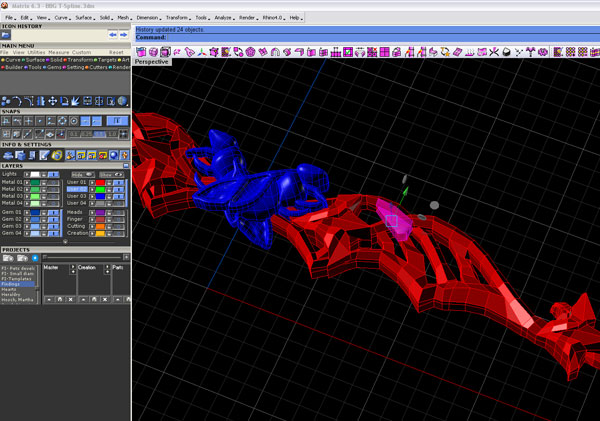
The screenshot shows both the smooth subdivision version of the program (the bees) as well as the blocky polygonal version (the bat wing), which T-Splines calls “smooth mode” and “box mode,” respectively.
“In both modes, every edge or face is a malleable item—I can grab and change any one of them to make it do what I want,” says the jeweler. The hot pink piece, for example, is a polygon that Magee selected from the model and pulled. “Yet it stays attached to everything around it,” he points out. “It’s not separate from the rest of the bat wing—it’s just one little part of it. If I pulled it up and changed its shape, it would keep its relationship with what’s around it. It would stand higher and pull the rest of the wing with it.”
Magee says the box mode uses up a lot less RAM, and changes are faster to make than in smooth mode, which takes the ring’s geometry and has to figure out its actual shape, slowing down the system. “If you’re dealing with a fairly simple object, you can work in smooth mode. But when it starts to get complicated, I use the box mode, and then toggle back to smooth mode to check how my design is looking,” Magee says.
Completing the Ring
After finishing his design, Magee took the elements created in T-Splines and overlaid them onto a shank created in Rhino and Matrix (below).
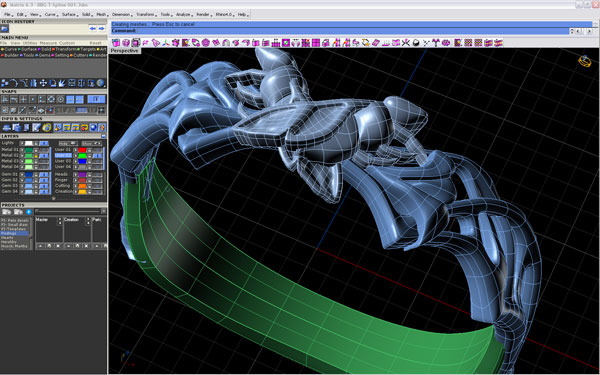
Once the ring was rounded, Magee was able to continue making tweaks to his design. “I still had the great malleability of T-Splines, to grab any edge or corner and just move those [polygons],” says Magee. “Without T-Splines, I would have had to make those changes in the wax.”
Once his work in T-Splines was complete, Magee was able to quickly convert the final design into NURBS, in preparation for manufacturing.
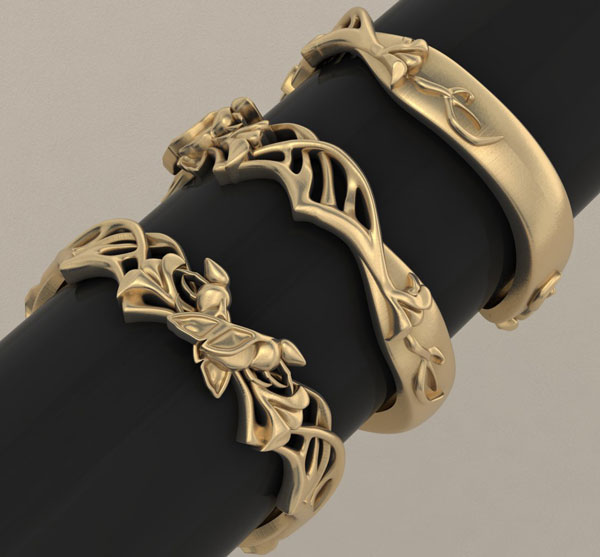
The three views of Magee’s final render show various perspectives of the ring. Note the little tendril-like element on either side of the outer portions of his design. “It’s like a little bat finger, but it’s also sort of vine-like, to relate to both the bat wing and the ginkgo,” Magee says.
While sculptural designs such as “Bee Bat Gingko” could be made by hand, he adds, it “would be very time consuming to do so.” In fact, because of the complicated flowing joints in his design, Magee believes he would not have been able to pull off what his client wanted without subdivision modeling.