

Solid Visuals
Dawn Muscio celebrates CAD
By Peggy Jo Donahue
When custom designer Dawn Muscio and her business partner (and computer tech expert) Jackie Williams went searching for CAD software at MJSA Expo New York in 2006, they had a bounty of programs from which to choose. Set up before them were five different programs, all demonstrating the same project. “Expo had arranged big screens so we could watch,” recalls Muscio. Immediately, the partners were drawn to 3Design by Vision Numeric because of its visual platform. “We liked the idea of having a solid model on the screen, so we could see what we were drawing.”
Muscio, who has a degree in fine arts from the Pratt Institute in Brooklyn, New York, spent many years working as a jewelry designer, model maker, and bench jeweler for other custom designers prior to opening her own custom design business, D. Muscio in Atlanta. Before adopting CAD, her usual way of working was to draw detailed architectural sketches of her jewelry designs to show customers, and she planned to continue doing so even after the partners incorporated CAD.
But both she and Williams felt that 3Design would add a visual third dimension to their work. Once customers had approved Muscio’s 2-D sketch, Williams would translate the drawing into CAD. Then they would be able to make further alterations with customers watching and contributing, because what they saw on the screen was a recognizable piece of jewelry. 3Design’s 4-port views would give customers the ability to see designs from a variety of angles, too. And Muscio loved 3Design’s ability to produce lifelike renderings that would enable the business to keep a virtual inventory of her designs.
From a technical perspective, Williams liked that 3Design had a building tree that saved each version of a design, with all the steps listed. If the designers needed to go back and change one element of the design, they could do so with a few clicks of the mouse. The software would then remake the whole piece—without the need to completely start over.
It was decided: 3Design was a great fit for D. Muscio—and after working with the program for five years, Muscio and Williams are still glad they chose it. “It’s not perfect-organic styles are still tough, and they’re never quite smooth enough,” says Muscio. “But my artistic style isn’t generally organic, so for private customers, it’s not a big problem.” D. Muscio still builds jewelry for trade customers, however; thus when an organic design comes in, Williams builds the base shape with 3Design, and Muscio then hand carves the rest in wax. “And Jackie can still find a way to get to many finished products with the different tools 3Design provides,” Muscio adds.
[Editor’s note: In 3Design CAD7, the newest version of the program, Vision Numeric has added 3Shaper, a feature that allows freeform modeling of complex organic designs. Offering what it says is a “real bridge between CAD and sculpture,” the tool allows jewelers to pick up edges, vertices, or surfaces, and move, scale, or rotate them.]
Muscio argues that CAD is just one tool in the jeweler’s toolbox, and that for some projects, fabrication is still the best solution. “Using CAD, you learn what’s still better to fabricate by hand, and that’s an important part of learning to use it for what it does best,” she says.
Making a Splash
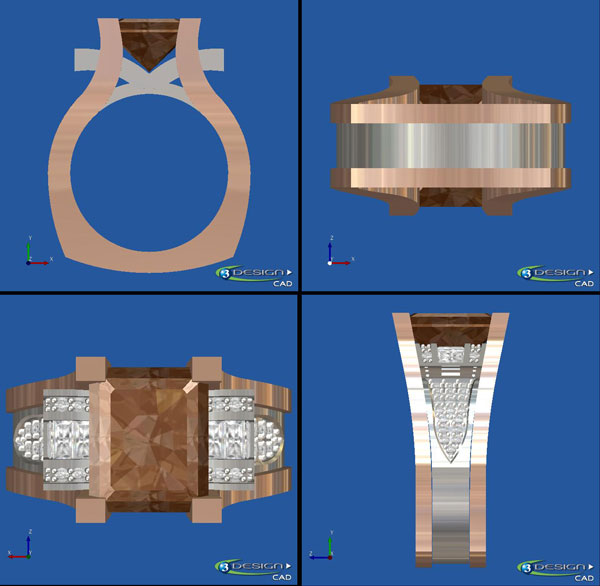
In Muscio’s shop, many designs require a combination of CAD and hand fabrication to achieve her desired outcome. Take for example “Splash,” a brown zircon and diamond ring that Muscio created to enter in a design contest. This piece illustrates what works in 3Design, and what D. Muscio’s version of the program is less adept at designing.
“My concept was to have the brown zircon center stone falling into the cantilevered wing of diamonds, which are then splashing out below,” says Muscio. The designer wanted the baguette and round diamonds, which create the “splash,” to go all the way across the ring. “Using CAD, we could accurately measure the stones and the prong heights to ensure that the culet of the main stone didn’t touch the diamonds beneath,” says Muscio.
Muscio and Williams built the ring in four different parts. First they milled and cast the diamond wing and Muscio set the stones. Then, they milled and cast the round center white gold shank, which anchors the ring. Muscio set the diamonds in the sides of this ring, which she tried ending a couple of different ways before settling on a cascade that ends in a point. The idea was to extend the concept of water by having the diamonds “trickle down” like water on both sides of the shank.
Once Muscio had both the wing and the white gold center ring in hand, she began fitting them together. And that’s when she ran into a challenge. Muscio, who would love to design furniture one day, planned to attach the wing to the center gold ring through a notched joint, which is often used in furniture because it’s secure and strong. “I knew there would be more surface area where the solder flows, to ensure the wing would stay well seated on the ring,” she says. “Notched joints, however, have to fit together perfectly-not too tight and not too loose, just enough so that they hold in place even before soldering.”
But the best-laid plans don’t always work out, Muscio found. She had done some extra finishing work on the two cast pieces, thus they no longer fit together as well as she would have liked. So she decided to add rivets to secure the wing and the ring. “I used two pink gold rivets, so it added a nice ring detail on the underside of the shank that only the customer would see-but would appreciate.”
In the final step, she and Williams milled and cast the two outside pink gold rings and soldered them onto the center ring. The prongs on these outer rings would secure the brown zircon center stone. But Williams had a tough time getting her earlier version of the 3Design program to create the more organically shaped prongs that Muscio envisioned. They finally gave up and cast them square, then Muscio finished the prongs by hand. The entire fabrication, setting, and assembly time took 16 to 18 hours, she estimates.
“I’m a designer with bench skills, and that helps enormously. When I create a design on paper, and Jackie translates it to CAD, all the details of what I want artistically may not always work in CAD,” concludes Muscio. “Or, we may need to mill and cast the elements separately. CAD has a super complex interface to try and cast all my designs in one piece, I’ve found. For some designs, it’s preferable to build the pieces, and then assemble them for the best final product.”
In other words, the jewelry produced using a CAD program is only as good as the designer and jeweler driving the process. For Muscio, her combination of design and bench skills has helped her judge when it’s best to use CAD—and when the old-fashioned way is better.