

Quest for Imperfection
Building flaws into CAD designs—on purpose
By Lee Krombholz
Jewelry makers who handcraft their pieces leave an indelible mark on the work for eternity. Physically interacting with metal and gemstones to shape and transform them into a wearable piece of art is a very personal process, and the resulting work reflects that. When CAD/CAM hit the jewelry scene, some jewelers were hesitant to embrace the technology because it made the jewelry-making process less personal. Jewelers’ hands were traded for computers that generated very precise, accurate models—but they usually lacked the subtle imperfections of a handcrafted piece.
As a classically trained goldsmith who has embraced CAD/CAM, I am on a quest to find ways to bring together the best of both worlds-to create jewelry pieces in CAD/CAM that have a handcrafted feel. After studying consumer preferences in my retail store for the past few years, I have come to realize that the perfection and symmetry produced by CAD is not always preferred by the masses. When presented with two nearly identical designs—one made by hand, the other produced using CAD/CAM—and asked which they liked better, the consumers who visited my store were essentially split 50/50. (To read more about this experiment, see “Old vs. New,” January 2010 MJSA Journal.)
In speaking with other jewelry makers about this topic, I have found that I am not alone in my mission to infuse imperfection into my CAD designs. And I think Wabi Sabi may be the answer.
What Is Wabi Sabi?
“The only perfection is imperfection,” says designer Robin Haley of Nashville, Tennessee, who introduced me to a Japanese aesthetic called Wabi Sabi, which essentially finds beauty in the imperfect. This belief is rooted in the Buddhist teaching of the three marks of existence, and specifically the one mark relating to impermanence. An example of the embodiment of this aesthetic is Japanese pottery, which showcases simple shapes that are not quite symmetric.
“Wabi Sabi is embracing the God in nature—the beauty of flow and movement,” says Haley. “It’s a ’feeling’ thing, like the singer whose song is felt so strongly that when her voice breaks by the force of that emotion she makes us understand her heart on a deeper level than when her voice just hits the notes on key.”
For the jewelry designer who uses CAD/CAM, taking a Wabi Sabi approach pushes you to include minor adjustments to symmetry and details to make your jewelry feel more human. It also means adding handwork to CAM models and finished castings to infuse your human fingerprint into the piece.
“The challenge in CAD is finding the human, and therefore divine, element,” says Haley. “It’s the same as the emotional element of the singer who connects with our souls by her im-perfection. CAD helps us get to our design, but the way we infuse the human touch into the piece lets its true beauty shine. That is Wabi Sabi.”
And this isn’t the first time in jewelry-making history that a push back from perfection has emerged, says Michael Coan, chair of the Jewelry Design Department at the Fashion Institute of Technology in New York City. “The Arts and Crafts movement was a response to the industrial revolution’s ’mechanical’ jewelry,” he says. “Hand-beaten metals and purposely imperfect craftsmanship were raised up as art.
“The individuality of design is what keeps us going, striving, re-thinking, and re-imagining our world,” Coan adds. “CAD is a great facilitator—a wonderful tool—but that tool has to be used, understood, and stretched by talented individuals who know history, know their contemporaries, and look to the unknown. Anyone can press the replicate/duplicate button, but consumers like to look for that ’thumbprint.’”
Tips for “Imperfecting” Your CAD Designs
The following are some techniques you can use to quickly and easily add elements of imperfection and asymmetry—the Wabi Sabi aesthetic—to your CAD designs.
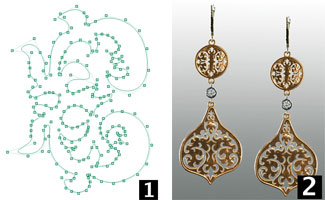
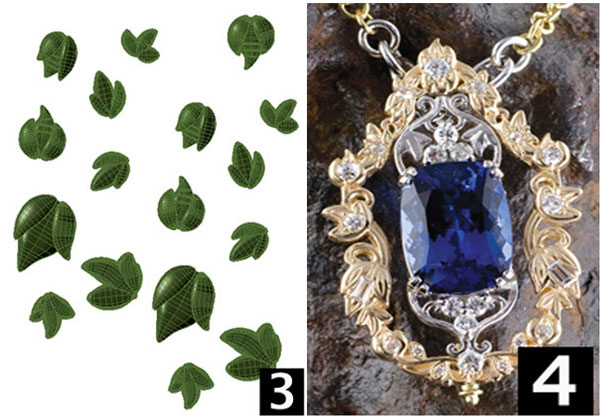
1. Work in curves. Sometimes when designing in CAD, I create cutters to remove designs out of flat surfaces. Instead of working with solid symmetric shapes to make these cutters, I work with curves and create smooth asymmetric shapes that can be extruded into a solid and used as a cutter (figure 1). When I get curves that I like, I store them in a folder for later use. To create variations, I can quickly take a curve out of the folder, edit, and extrude it.
Working in curves gives me more design freedom and allows me to create asymmetric yet attractive designs that are not based on the same symmetric shapes. In these earrings (figure 2), I designed the filigree pattern that is pierced into them with cutters created from extruded curves. I can create many variations of these designs quickly by adjusting the curves, extruding new cutters, and piercing the base shapes again.
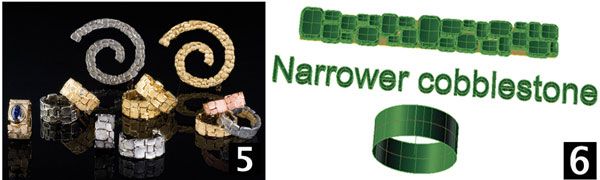
2. Create a parts library. By creating an inventory of adapted variations of parts like these leaves and flowers (figure 3), I have an arsenal of organic looking parts to add and re-adapt to my designs for the Wabi Sabi effect.
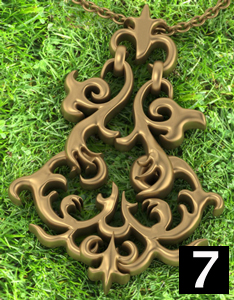
This pin/pendant (figure 4) was created using a range of adapted floral parts. I created these shapes using surface modeling, then rescaled and bent the individual parts. After doing so, I always create a copy of the part, rescale it, and bend it again. By doing this over and over again and saving the entire collection I can create variations of this design quickly and easily. I should note that I could have created a less symmetric pattern side to side, but my client required this symmetry.
3. Use the Flow Along Surface command. Using the Flow Along Surface command in Matrix, which allows for the random organization of parts on a chosen surface, I created this cobblestone effect (figure 5). (Most CAD programs should have a similar command for this application.) I began by creating a UV curve from the base surface on the ring rail. I then selected cobblestones from a folder in which I have saved many of them in various sizes and shapes. When I was happy with the flat layout of the shapes (figure 6), I used the command to “flow” them back onto the base shape on the ring rail.
Using a flat layout process with these shapes allows me to more efficiently create a pleasing layout that can be varied from ring to ring, creating totally unique designs quickly and inexpensively.
4. Try subdivision modeling. To achieve organic shapes, jewelry designers now have an amazing tool at their disposal in subdivision modeling. A plug-in called T-Splines, which is available for Rhinocerous, SolidWorks, and Gemvision’s Matrix 7, allows for complex shapes to be created out of polygons rather than with the points used in traditional NURBS-based (Non-Uniform Rational B-Splines) surface modeling. [Editor’s Note: Jewelry-specific subdivision modeling is also available in the 3Design program from Vision Numeric, through a plug-in called 3Shaper.] Think of it as tugging and pulling the polygons as you would clay to shape the design.
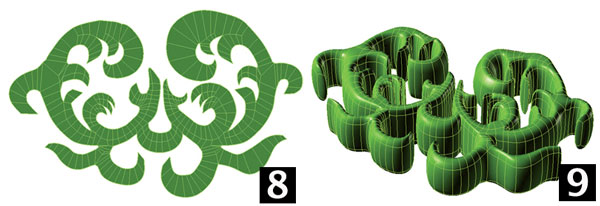
Using T-Splines, I can create asymmetric designs much faster and with much more freedom than I could in the past—a degree of control that was not available before. This pendant (figure 7) was created from T-Spline’s objects that were scaled, curved, and adapted to fit the design. In this design, you can pick out the base parts that I mirrored horizontally and then adapted in various ways to create asymmetry yet retain the balance of the shape. I started with a curve that I had created and used before in other designs. From this curve I adapted a flat plane (figure 8) to fit it.
From that flat shaped plane, I used the Thicken command to create the 3-D rounded shape (figure 9) that I used in the bottom section of the pendant design.

After creating all five of the component shapes in the pendant design, I adapted the height of the components by using point editing (figure 10), giving them an over and under effect. I also created a pair of earrings (figure 11) using the same components that I used for the pendant. Although they have a more symmetric orientation, you can still appreciate the flow of the design and the freeform shapes as they appear in the finished piece, which are uncharacteristic of CAD/CAM.
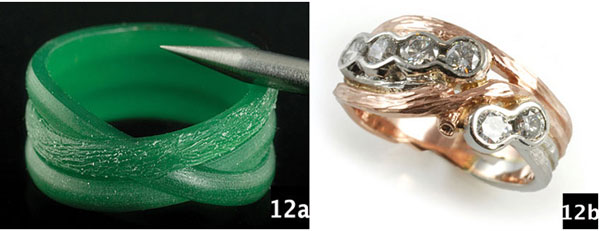
5. Detail your CAM models by hand. By adding handwork to CAM models and finished castings, you can infuse your human fingerprint into the piece. In the first example shown here (figures 12a and b), I textured the milled wax by hand to create the branches in the band. In the second example (figures 13a and b), a ring design by Robin Haley, I heavily adapted the CAM model to fit the irregularly shaped Peruvian opal. I started the design by taking a 2-D scan of the opal.
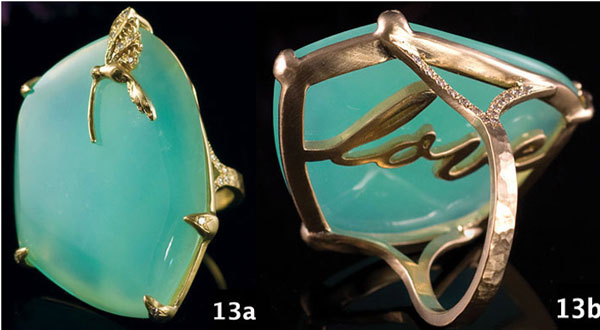
I then created an under-bezel with the word “love” running though the center as one flat component. The opal was far from flat, so I made the wax model thick enough that I could carve it to fit the stone’s irregular curvature. I also designed the shank with some extra length on the top ends so I could adapt them to fit the newly curved under-bezel. The ring was cast in parts and laser welded together before all the stones were set.
Since I have been working in CAD, I have become more aware of its benefits, challenges, and limitations. To advance my designs, I have to push past my instincts of wanting exact precision and purposefully add organic, natural imperfections. It’s easy to create CAD designs that are super clean and geometric; it’s much harder to design pieces that have the Wabi Sabi factor. If you embrace the theory and put some of the approaches outlined here into practice, you will elevate the quality of your designs to a new level.