

Digital Dive
Tips for taking the plunge into CAD
By Shawna Kulpa
Computer-aided design (CAD) has been around for a while, but that doesn’t mean there aren’t a lot of people for whom it’s still new. They range from fresh-faced students dreaming of careers in jewelry design to grizzled veterans interested in improving production, but all share one common question: where to begin?

Just like the other skills needed in the creation of jewelry, designing in CAD takes a lot of time and effort to master. In fact, between sifting through the different CAD software options, determining system requirements, and familiarizing yourself with new terminology (Boolean, anyone?), it can feel a little overwhelming. Fortunately, help is available. We asked several experts who have worked in CAD for years for their best tips for the next generation of users. By following their advice, you’ll have a leg up on taking the “digital dive” and deepening your design expertise.
Brush Up on Jewelry Making
If you’re completely new not just to CAD but to the entire world of jewelry making, the first thing you’ll want to do is actually spend some time at a jeweler’s bench.
“If you’re getting into CAD, brush up on jewelry-making knowledge,” says Charlie Herner of Gem State Concepts in Sun Valley, Idaho. “That’s what gets a lot of CAD modelers in trouble. They can build stuff, but if they don’t know how it works, they can run into dead ends right off the bat.” While Herner says it’s not necessary to become an expert at all aspects of jewelry design and production, he recommends making sure you understand how things are built and the scale in which you’ll be working.
“Measuring is critical,” says Herner, who recommends having a micrometer on hand whether you’re working at the bench or at your computer. “It will help you understand and be a better gauge of size.”
This learning experience doesn’t have to require a big investment of time. Russ Hyder of the Jewelry CAD Institute in Las Vegas says that spending just two or three days sitting alongside a bench jeweler is a good start.
“It definitely helps if you are a bench jeweler and you know how things are manufactured,” says Hyder. “But if you don’t, and you’re an artist, you need to sit down with a bench jeweler and walk through what he does, from the raw casting to polishing and finishing…[to] learn how stones are set and how much is [involved] in the finishing of the piece itself, how much you’ll lose in metal thickness, prong heights, etc.” This will not only help you to create better CAD designs suitable for manufacturing, but also help you to understand that workable CAD designs may not always look realistic.
“It’s a good idea to realize that when you’re making models in CAD, you’re really making two models: one for manufacturing and one for show,” says Hyder. “If you render something for a client, they’re going to want to see a finished piece of jewelry, but that’s not what you’re manufacturing—the prongs may be too long or something will look too thick. You have to understand that what you see on screen will look bigger than it really is. It’s one of the toughest variables out there.”
Even if you’re a wizened jeweler with decades of experience at the bench, there may be some things you need to learn as well. If you currently sub-contract out your casting and plan to continue to do so, it would be wise to sit down with your caster to ask for advice on your CAD models. Since he already knows your design style and some of the features that may frequently appear in your pieces, does he have any specific advice on things you should do to them in CAD to render the best casting results?
Gearing Up
Basic computer skills are a must for anyone looking to get into CAD. Darla Alvarez, a jewelry CAD/CAM instructor at GIA in Carlsbad, California, recommends that if you don’t have a lot of experience working with computers, start with a basic skills class to learn things such as saving, finding, and opening files, as well as using a mouse.
When you’re ready to invest in a CAD program, Hyder recommends selecting the software first, then the computer. But which program do you choose? Many CAD experts recommend starting out with a lower-cost program, such as Rhino, before investing in a more expensive program.
“You need to start off with a less expensive program in case it doesn’t pay off,” says Tim Cottrell of TSJC Designs in Leeds, United Kingdom. “Some of the programs can be complex, but take it slowly and watch plenty of videos.”
Alvarez also thinks a basic program is the best place to start, but cautions that you should try to use a program that’s widely used.
“Stick with one of those that are prevalent in the industry as opposed to general software programs,” she says. There are numerous online support groups for jewelers using CAD, and by sticking with a program that’s common in the industry, you’re more likely to find online support and tutorials catering to jewelers.
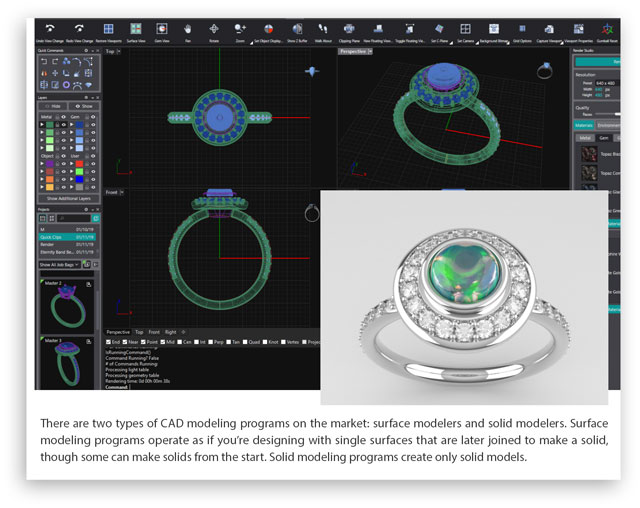
Also, be aware that there are two types of CAD modeling programs on the market: surface modelers and solid modelers.
Surface modeling programs, such as Rhino and Matrix, operate as if you’re designing with single surfaces that are later joined to make a solid, though some can make solids from the start. Solid modeling programs, such as Solidworks, create only solid models.
“Surface modeling,” Hyder explains, “gives you more flexibility in what you [can] do with surfaces, such as sweeping,” a common CAD function that turns a 2-D sketch into a 3-D image. However, he notes that if you make changes to part of a design in a surface modeler, until just recently, you then had to go through the rest of the design to manually change things affected by that initial change if history was not enabled.
“Solidworks modeling can change the rest of the model automatically for you, which is called parametric,” he says. “Plus, you never have to worry about naked edges [edges that aren’t connected to other edges]—it makes a solid model.”
When it comes to selecting between the two types, Hyder believes it’s simply a matter of preference and that both types would have about equal learning curves for beginners. However, he does think surface builders offer more flexibility and that the software itself tends to be easier to use.
“I teach and use [surface modeling programs] simply because I believe that if you can master curves and surfacing, you can master anything,” says Hyder.
Robert Descoteaux of National Chain Group in Warwick, Rhode Island, agrees that it comes down to a matter of preference. “Solid modeling works great for geometric shapes; surface modelers work great for organic shapes. It depends on what you’re building. There’s really no difference in learning them for beginners. They both function basically the same.”
Before deciding on a CAD program, don’t forget to look into the type and level of support that each program’s developer offers. One of the reasons why this is so critical is because some of the programs in use within the industry weren’t originally created for jewelry design.
“You want to know what kind of support you’ll get,” says David Olmsted, a CAD designer and master craftsman with ALDavid in York, Pennsylvania. “If you’re working at midnight, is there support service available? Can they walk you through your problem?”
To help you assess the level of help that developers can offer, CAD experts recommend asking other jewelers about the CAD programs they use and the types of problems the program’s tech support has helped them to resolve.
“Get as much information as you can from independent people who have been using the software,” says Cottrell. “What do they recommend and why? You’re looking for common threads.”
One final thing that you’ll want to consider when selecting a program is how many users will be able to access it. Generally, purchasing a CAD program or software license grants one person use of the software. If it’s just yourself, that would be enough. But if you think that in the future you may have additional shop staff working in CAD, ask about the cost for additional licenses.
“Look into how many people can use the software key,” says Hyder. “Some developers will sell you separate keys at a lower price if you want multiple people to be able to use the software at the same time.”
CAD Accoutrements
Once you’ve settled on a CAD program, you’ll need to make sure that your current computer equipment can handle the workload.
“CAD works in three dimensions, and there’s going to be a lot of data on your computer,” says Hyder. “You’re going to need power to run [the program] and for rendering purposes.”
The software developer should provide you with a list of the system requirements needed to run the specific CAD program on which you’ve settled. Obtain a copy of the program’s requirements to see if your current equipment is up to the task or if an upgrade is in order.
“A lot of guys don’t do that,” says Olmsted. “They think they can just run it off their HP notebook. And they may, but it’ll be slow.”
When reviewing the requirements, look to see if they’re the minimum requirements or the recommended specifications. While the minimum requirements may be all that’s needed to run the program, you’ll likely have a better experience if you follow the recommended specs.
“When they say minimum, they do mean minimum,” says Alvarez. “You won’t get optimum performance at the minimum. Get a little above the specifications and you’ll have a better experience. Plus, you’re ready if the program updates.”
Another reason to consider going above and beyond on the recommended specs is because those specs don’t take into account all of the model renders that you’ll create and save on the computer. Those renders can take up a lot of space over time.
“You’re going to need a lot of RAM,” says Hyder, who recommends investing in a computer with at least a 2 TB hard drive. “These files are data heavy. By the time you do a ton of rendering, you’re going to need the space to store them. If you’re interested in a specific software, ask [the developer] what kind of computer you should get to run its software.”
If you’re going to invest in a new computer, consider where you’ll be doing your CAD work. Do you plan to do that work only in your shop, or would you like to also be able to work at home or while you’re traveling? If you plan to confine CAD to the shop, consider investing in a new desktop computer rather than a laptop.
“Desktops are cheaper and you can get more bang for your buck, though you’ll be stationary,” says Alvarez. “If you don’t need a laptop, don’t get one because they’re pretty pricey.”
Hyder echoes that sentiment. “If you compare apples to apples, desktops will outlast laptops longevity wise.” Consider a laptop, he says, only if you need the portability.
In addition to getting a computer capable of running the CAD program, Alvarez recommends investing in a 3-D printer. “If you can swing it, invest in some sort of printer because you’ll get that instant feedback,” she says. “You can see right away if prongs are too small or a wire is too thin. There are some pretty well-priced printers out there. Even if the models are not castable, it’s for your learning. And you can show clients their models, which makes the piece a reality for them.”
Practice Makes Perfect
Once you’ve purchased the CAD software and have it running, it’s time to learn how to use it. Many software developers offer some initial training to get new users up to speed. But don’t expect to become proficient after that initial training weekend.
“If you do a three- to five-day intensive training session, you get saturated,” says Olmsted. “There’s only so much information that’s going to stick with you. You’re still going to have to go back over things because there are so many nuances.”
Many software manufacturers offer different levels of training sessions, and some will even come out and offer users on-site instruction. “If you can’t get out of your store, they can come to you,” says Alvarez. “They can also personalize the training to your needs. But it can all be pricey.”
As an alternative, Alvarez recommends checking with the software developer’s website for training videos. “Manufacturers put out the best training materials,” she says.
If you’ve exhausted the developer’s videos, or are looking for instruction in something very specific, Herner suggests turning to YouTube videos. “There’s so much content out there of people building models,” he says. “Watching other people is a good way to learn.”
Regardless of how you train, be prepared to put in a lot of time learning the program. And plan to practice often.
“Like any skill, CAD isn’t something that you can stop for four months and think you’ll remember,” says Alvarez. “You can’t leave the program and come back to it.”
Hyder agrees. “You can’t work on it for two hours one day and come back three weeks later and remember what you did. I would suggest two and a half to three hours a day, five days a week to get this into your brain so it becomes automatic. Some take to it like a duck to water, others not so much. But in six months you should be able to make just about anything you want.”
“If you’re a bench jeweler dabbling in CAD, try to set aside 10 to 15 hours a week,” recommends Herner, who expects a jeweler putting in that kind of time to be proficient in CAD in about a year. “Once you know what you’re doing, you don’t think that much. You just do.”
Although many CAD programs contain “builders” designed to help save users time and effort, Alvarez recommends avoiding them at first. “You should learn how to do things longhand in case those builders fail,” she says. “Builders can help expedite the workflow, but you should learn how to do it yourself first.”
And ultimately, all of that practice should pay off, allowing you to quickly and easily create your jewelry designs. “The nice thing about CAD,” says Descoteaux, “is that the more you use it, the better you get.”
If you’re interested in learning more about CAD design and where the technology is headed, be sure to check the article The Future of CAD?